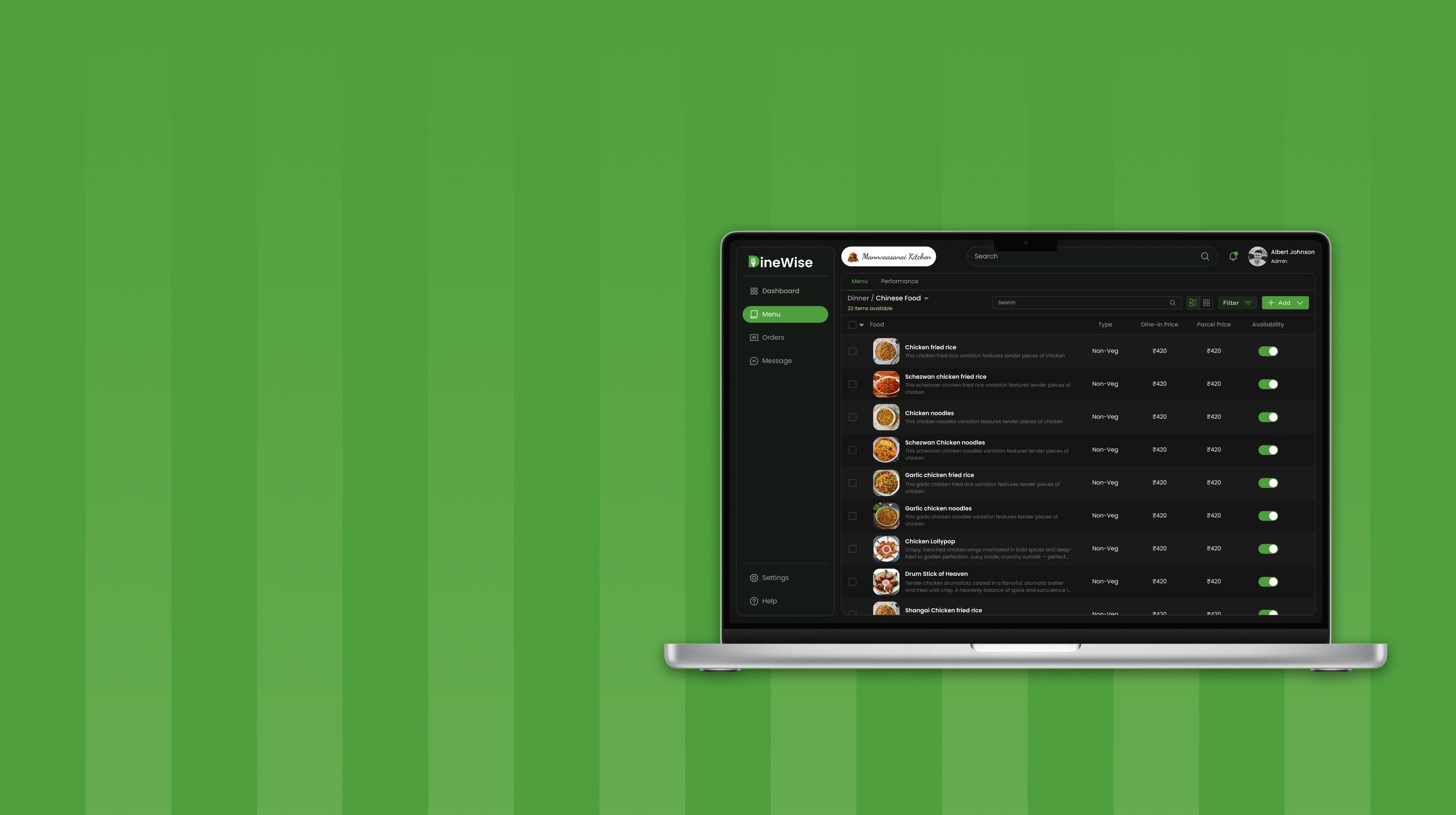

From paper-based chaos to structured clinic operations
Health Tech
SaaS B2B
Overview
In the clinics we studied, staff spent most of their time managing walk-in appointments, updating paper records, and coordinating between doctor and nurse through constant follow-ups. Even simple tasks involved repeated back-and-forth. This case study restructures those workflows into a more streamlined, coordinated system.
Manual Dependency
Less reliance on paper records and manual updates across workflows
Coordination Load
Reduced need for constant follow-ups between doctor and nurse
Operational Visibility
Clear view of appointments, patient data, and ongoing tasks
Workflow Throughput
More tasks handled without delays or repeated steps
Role
UX Design, Flows, Visual Design
Tools


Contributors


Problem
Clinic operations don’t slow down because of workload, but because every task depends on manual steps and constant coordination
In the clinics we studied, even routine tasks like managing appointments, updating patient records, or writing prescriptions required switching between paper notes, registers, and verbal coordination between staff. With no shared system, information remained fragmented across multiple touchpoints, forcing repeated back-and-forth between doctor and nurse just to confirm or update basic details. During busy hours, this constant need to check, clarify, and sync information slowed down workflows, increased the chances of missed updates, and made day-to-day operations harder to manage reliably.


Research & Discovery
Conducted interviews with doctors and clinic staff to understand how appointments, patient records, and daily operations are managed across fragmented manual and digital workflows
01
Information is spread, not structured
Patient details, appointments, and prescriptions are maintained across registers, loose sheets, and occasional digital tools, with no single source of truth. This forces staff to piece together information from multiple places, slowing even simple tasks.
02
Work depends on coordination, not systems
Clinic operations rely on doctors and nurses constantly checking and confirming details with each other. Without a shared system, even routine actions require back-and-forth communication to stay aligned.
03
Manual methods persist because they feel faster
Although some clinics use software, many avoid it during daily operations because it slows them down. Instead, staff rely on paper and memory, which feel quicker in the moment but create inefficiencies over time.
User Understanding
User Persona
From the interviews, it became clear that clinic owners and staff manage appointments, patient records, and daily operations while constantly coordinating with each other. In the absence of a shared system, they rely on manual processes, which shifts their time toward operational tasks instead of efficient patient handling and informed decision-making.

Course of Action
Defining system-level decisions to reduce manual coordination and structure clinic workflows
The research revealed that clinic inefficiencies were driven not by workload, but by how information and tasks were handled across disconnected processes. Based on these insights, I focused on redefining how appointments, patient data, and daily actions are structured, shifting from coordination-heavy workflows to a system that supports clarity, continuity, and faster execution.
01
Created a reliable source of truth for patient information
Consolidated patient details, appointments, and records into a single structured system, eliminating the need to piece together information from multiple sources.
02
Shifted coordination from people to the system
Reduced reliance on constant doctor–nurse communication by making critical information visible and accessible within the workflow itself.
03
Aligned system interactions with real clinic behavior
Designed key workflows to be fast and flexible, ensuring they support how clinics actually operate rather than slowing down day-to-day tasks.
04
Integrated fragmented tasks into a unified operational flow
Connected previously separate actions into a continuous system, enabling smoother transitions between tasks without context switching.
System Design
User Flow
The system was structured to mirror how clinic operations actually unfold across roles, translating fragmented tasks into clear, sequential flows. From appointment creation to consultation and prescription, each step is connected to ensure information moves forward without repeated verification. By aligning nurse and doctor workflows within a shared flow, the system reduces coordination overhead and brings clarity and continuity to everyday operations.


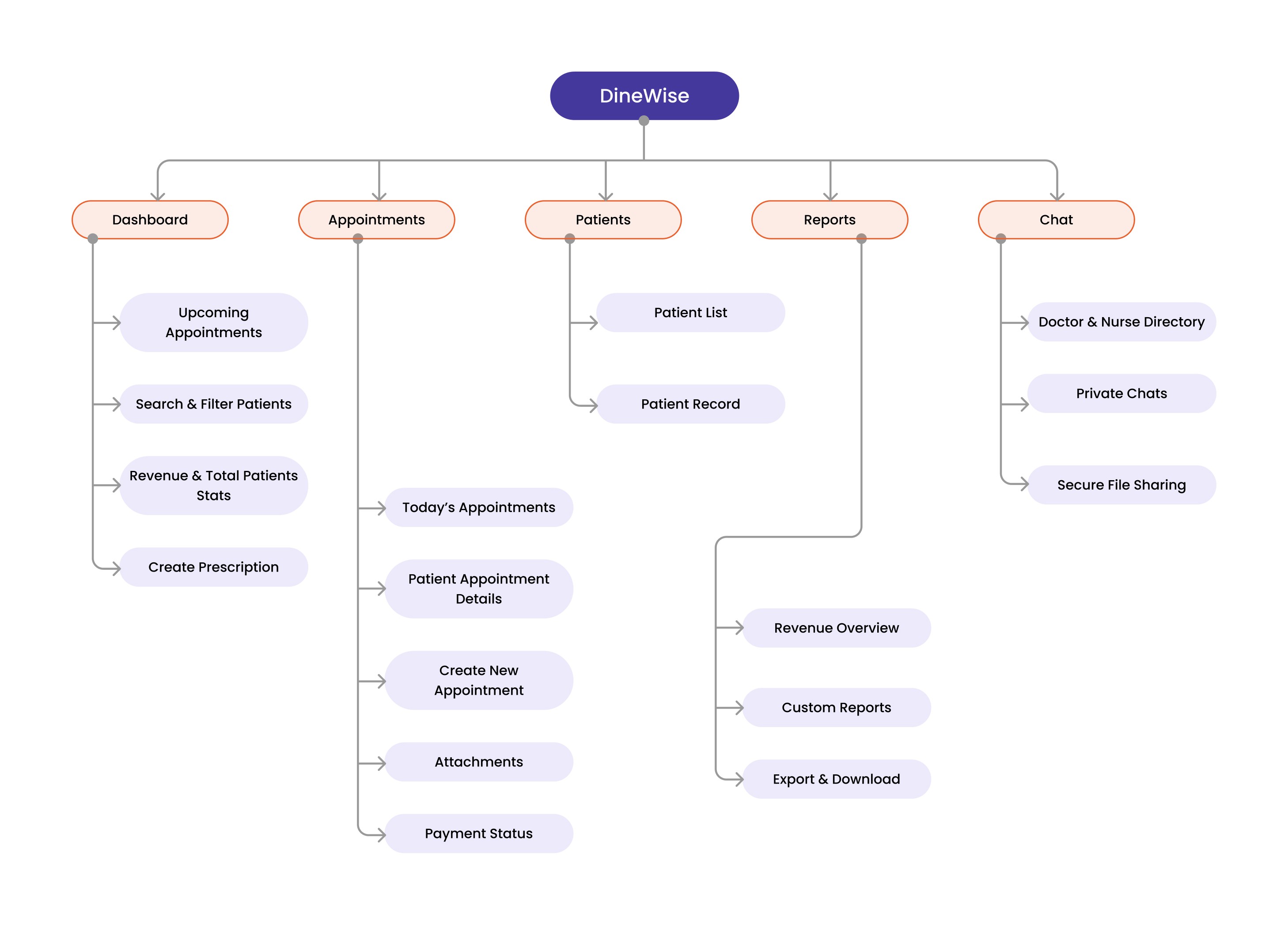
Information Architecture
The information architecture was structured around how clinic operations are actually performed, grouping related actions and data into clear functional areas. Instead of separating features, appointments, patient records, prescriptions, and communication are organized to reflect their real-world dependencies, ensuring information remains connected as it moves across workflows. This reduces the need to navigate between disconnected sections and enables faster, more intuitive access to critical tasks.
Initial Ideas
Iterating on interface layouts to simplify how clinic tasks are handled on screen
After defining the system flows and structure, the next step was to shape how these interactions would be experienced through the interface. Different layout approaches were explored to organize appointments, patient information, and prescriptions in a way that supports quick understanding and action. The focus was on deciding what should be visible first, how actions should be placed, and how much can be managed without switching screens. These iterations helped refine the layouts toward better hierarchy, fewer interruptions, and keeping related tasks within a single working context.

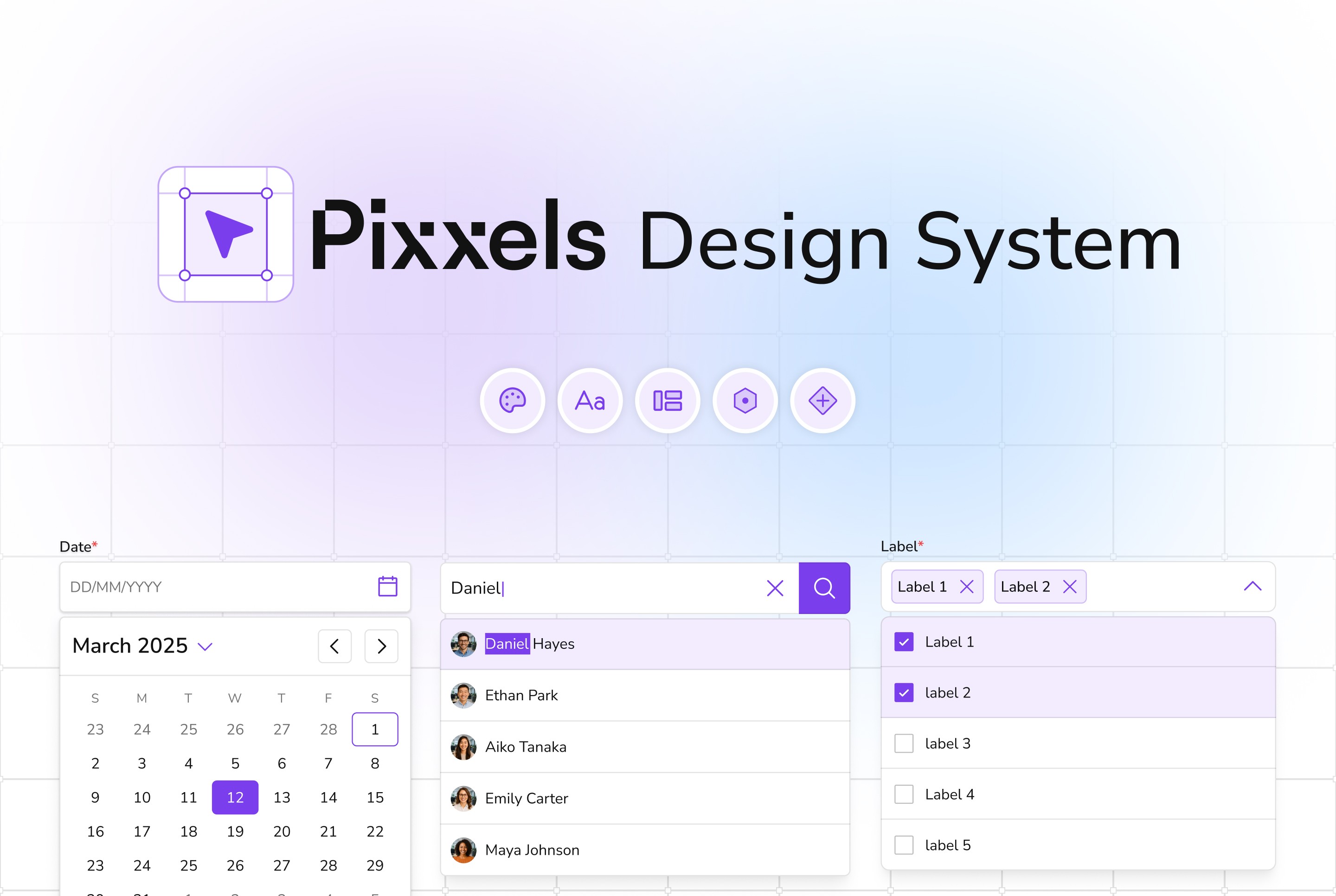
Design System
Creating a visual system that ensures clarity, consistency, and predictable interactions across the product
With the structure and flows defined, the focus shifted to building a consistent interface system that supports data-heavy workflows across different sections. The goal was to ensure that information, actions, and system states are presented clearly and behave consistently, so interactions remain predictable and easy to understand as users move through the product.
Design Principles
Prioritized clear information hierarchy to make data-heavy screens easier to scan and understand
Used consistent spacing and grouping to reduce visual clutter and improve content organization
Ensured readability through accessible contrast and typography, adhering to WCAG AA standards
System Consistency & States
A unified system was established for colors, components, and interaction states to maintain consistency across the product. From indicating availability and status changes to highlighting actions and feedback, each element is designed to communicate clearly and remain accessible, ensuring a cohesive and reliable experience across different workflows.

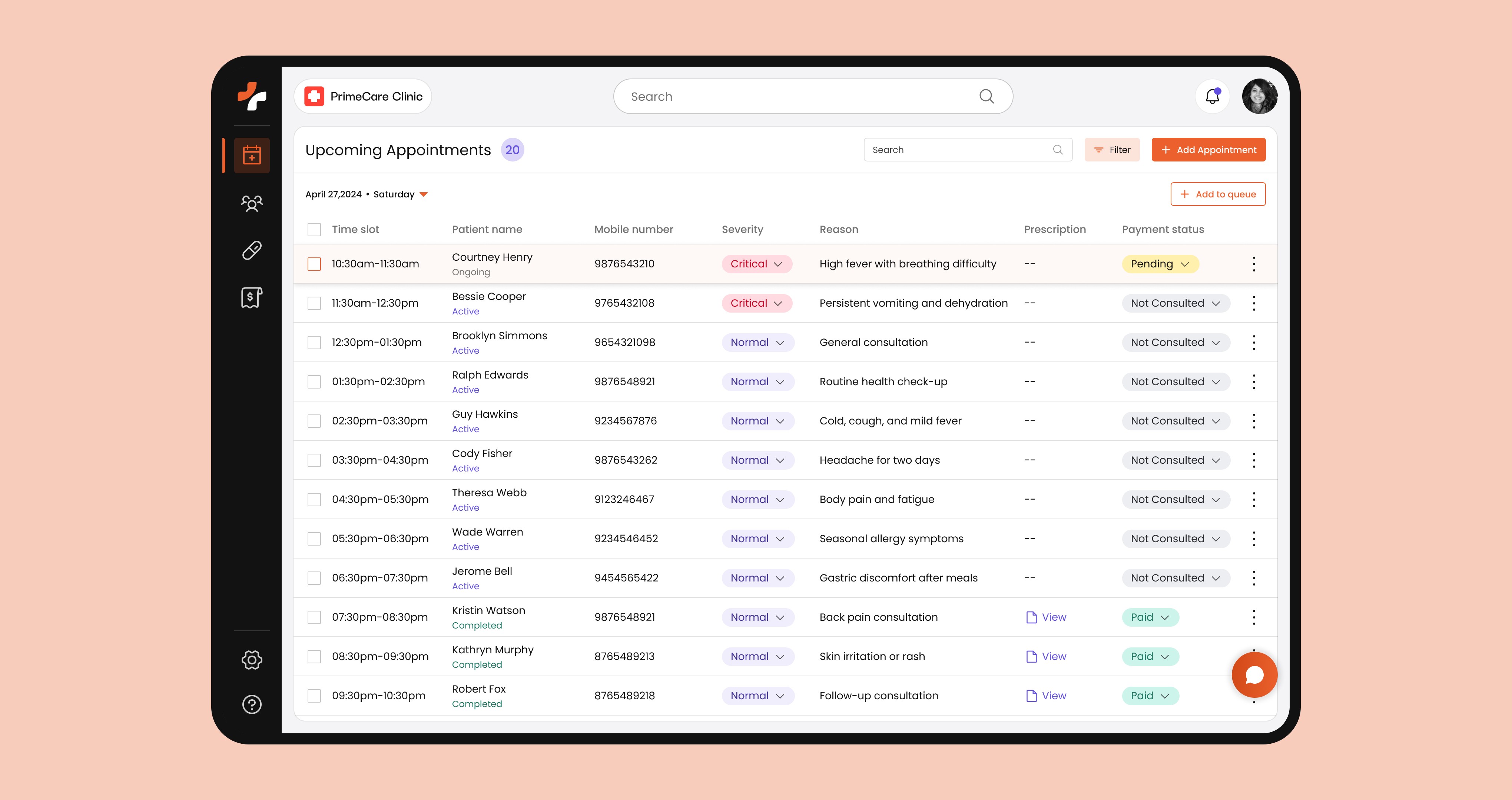
Nurse Dashboard
A real-time operational view to manage patient queues, prioritize critical cases, and keep consultations on track
This dashboard is designed around how the front desk actually operates during busy hours — tracking who is waiting, who is being consulted, and what needs attention next. Instead of switching between registers or asking for updates, staff can see appointment order, patient condition, and consultation status in one place, enabling faster decisions and smoother patient handling throughout the day.
Problem
During peak hours, staff rely on memory, paper registers, and verbal updates to track patient order and consultation status. This often leads to missed updates, confusion in queue handling, and delays in identifying high-priority cases.
Solution
The dashboard structures appointments into a live queue, showing patient details, severity indicators, and consultation status in a single view, allowing staff to quickly identify who needs to be attended next and take immediate action.
Rationale
In clinics, decision-making happens in the moment. Providing a continuously updated view of patient flow reduces the need for constant checking and coordination, enabling staff to stay aligned without interrupting each other.
Impact
Reduces confusion in queue management, improves response to critical patients, and minimizes back-and-forth communication, helping clinics handle higher patient volume with better control and consistency.
Appointment Creation
Capturing patient intake and scheduling in one uninterrupted flow, even during peak front-desk rush
Appointment creation often happens while patients are waiting, asking questions, or being redirected, making it easy to miss details or break flow. This interface is designed to support that reality — allowing staff to capture patient information, assign timing, and note basic context in a single pass without pausing or switching between sources. The structure keeps the interaction moving forward, even when interruptions occur.
Problem
At the front desk, appointment booking is rarely a clean, step-by-step task. Staff collect details while handling multiple patients, often leading to partial entries, repeated questions, and confusion when information is missed or recorded inconsistently.
Solution
The screen organizes patient intake, appointment details, and contextual inputs into a continuous flow, enabling staff to complete bookings in one go while keeping all required information visible and connected.
Rationale
Since appointment creation happens in a high-interruption environment, the interaction is designed to be forward-moving and forgiving, allowing staff to quickly enter, adjust, and confirm details without restarting or cross-checking multiple records.
Impact
Reduces incomplete bookings, minimizes repeated clarification with patients, and keeps the front desk moving efficiently, even during busy periods with high patient volume.

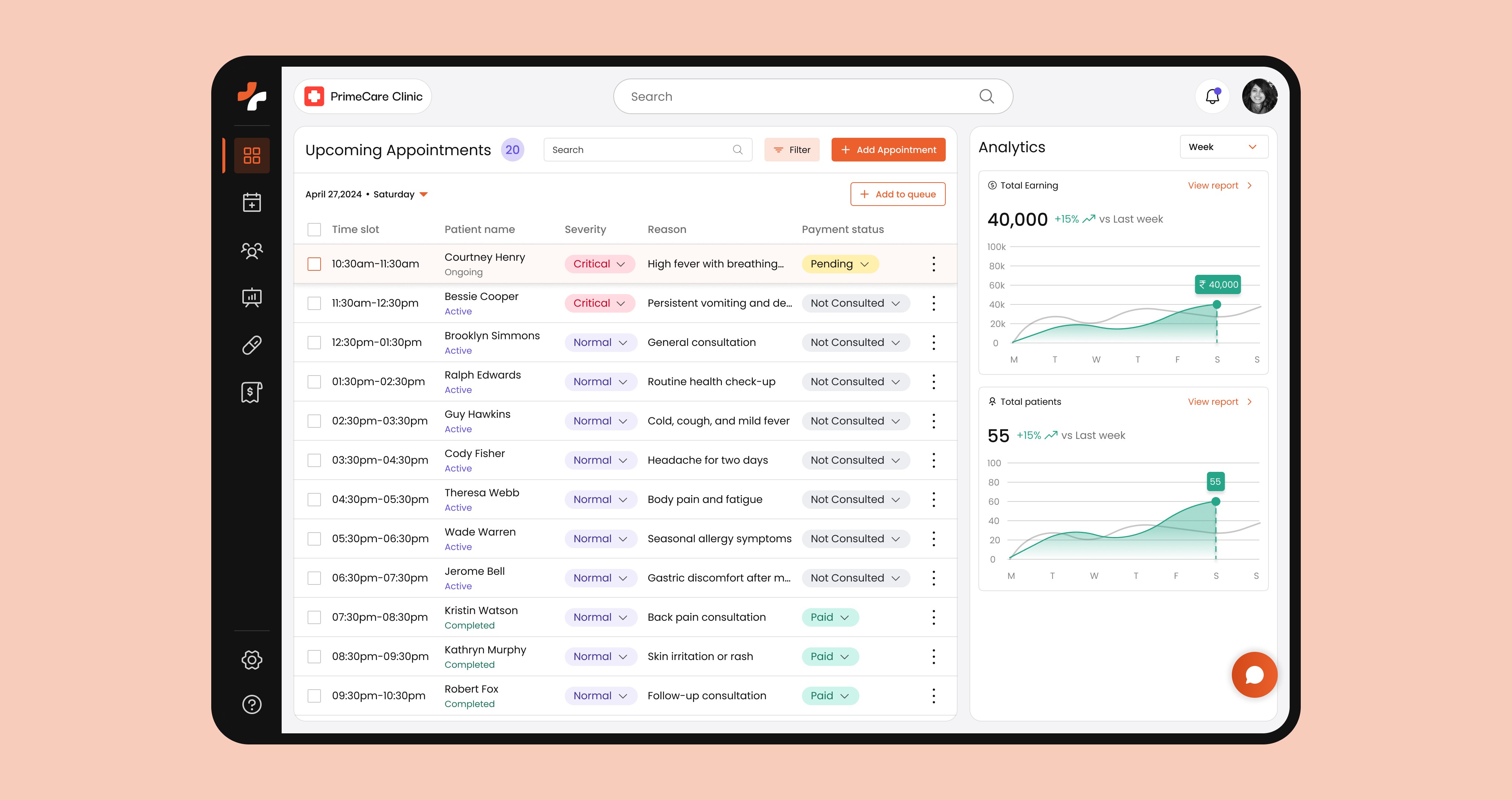
Doctor Dashboard
A real-time overview for doctors to track patient flow, monitor trends, and stay aware of clinic performance between consultations
Between consultations, doctors need a quick sense of what’s happening — how many patients are waiting, which cases need attention, and how the day is progressing overall. This screen brings together appointment flow and key metrics like patient count and earnings, allowing doctors to step back, assess patterns, and make quick decisions without digging through multiple views.
Problem
Doctors often lack a quick, reliable view of overall clinic activity. Understanding patient load, progress, or daily performance usually requires asking staff or checking multiple sources, breaking focus between consultations.
Solution
The dashboard combines appointment flow with key metrics such as patient count and revenue, giving doctors a quick, glanceable overview of both ongoing activity and overall performance.
Rationale
Doctors operate in short gaps between consultations. Providing a concise, high-level view helps them quickly assess workload and trends without interrupting their primary focus on patient care.
Impact
Improves situational awareness, enables faster decisions during busy hours, and reduces dependency on staff for updates, helping doctors stay in control of both patient flow and clinic performance.
Prescription
A prescribing workspace that lets doctors think, verify, and document in one continuous flow
During prescribing, doctors constantly move between recalling patient context, validating details, and deciding the next step. This screen is built to support that back-and-forth without breaking momentum. Patient information, vitals, complaints, and medication inputs stay within reach, allowing doctors to adjust, add, or review details as they go, instead of switching views or relying on memory mid-consultation.
Problem
Prescription writing often requires doctors to mentally track patient details while navigating between notes, history, and inputs. This creates gaps where information can be overlooked or incorrectly recorded, especially during fast-paced consultations.
Solution
The interface keeps patient context and prescribing inputs tightly coupled, enabling doctors to review key details and enter medications, notes, and follow-ups within the same workspace.
Rationale
Prescribing is iterative — doctors don’t follow a fixed order. Keeping inputs and context together allows them to move naturally between reviewing and recording, without pausing to search or re-confirm information.
Impact
Reduces cognitive load during consultations, improves accuracy in prescriptions, and helps doctors complete prescribing faster without interrupting their thought process.

Prescription Preview
A verification checkpoint to review the prescription as a final document before it is shared
Before handing over a prescription, doctors quickly re-scan what they’ve written — checking dosages, instructions, and patient details in one glance. This screen presents the prescription in its final format, allowing doctors to validate the complete output as it will be seen by the patient. It supports quick corrections and confirmation without stepping back into individual input fields.
Problem
After entering details, doctors often have to mentally reconstruct the full prescription to ensure nothing is missing or incorrect. This makes it easy to overlook small but critical details, especially during fast consultations.
Solution
The preview assembles all entered information into a structured, document-like view, enabling doctors to review the prescription exactly as it will be shared before confirming.
Rationale
Doctors validate outcomes, not just inputs. Presenting the prescription as a complete document allows them to check coherence, clarity, and correctness in a single pass.
Impact
Reduces last-minute errors, improves confidence in the final output, and ensures prescriptions are clear and complete before being shared with the patient.

Patient Past History
A patient timeline that helps doctors reconnect past visits with the current consultation
When a patient returns, doctors don’t just look for past records—they try to reconstruct what changed over time. This screen lays out previous visits, complaints, medications, and reports in a way that can be scanned quickly during a live consultation. It allows doctors to piece together progression, spot patterns, and relate past decisions to the current condition without digging through files or relying on recall.
Problem
During repeat visits, doctors often rely on memory or scattered records to understand what was previously diagnosed or prescribed. This makes it difficult to track progression and leads to repeated questioning or inconsistent decisions.
Solution
The interface organizes past consultations, prescriptions, and reports into a continuous, date-based view, allowing doctors to quickly revisit what was done, what changed, and what needs attention now.
Rationale
Follow-up consultations depend on context built over time. Presenting history as a connected timeline helps doctors move beyond isolated records and understand the patient’s journey as a whole.
Impact
Reduces time spent reconstructing patient history, improves continuity in treatment decisions, and enables more confident follow-up consultations without relying on incomplete recall.

Chat
A side-channel for quick, context-aware coordination without pausing ongoing work
During clinic hours, staff constantly need to confirm small but critical details — whether a patient has arrived, if a report is ready, or to flag something for the doctor. These interactions are brief but frequent, and pulling away from the main workflow to handle them creates friction. This chat sits alongside the working screen, allowing messages to be sent and received in context, so coordination happens without stopping the task at hand.
Problem
Most coordination in clinics happens through quick verbal exchanges or interruptions, which break focus, get missed, or require repeating the same information multiple times.
Solution
The interface provides an in-context messaging layer where staff can share updates, ask for clarification, and respond without leaving their current screen or workflow.
Rationale
Clinic coordination is situational and time-sensitive. Embedding communication within the workflow ensures that information is exchanged at the right moment, without disrupting ongoing tasks.
Impact
Reduces reliance on interruptions, improves clarity of communication, and helps staff stay aligned without slowing down daily operations.

Overall Impact
Constant Back-and-Forth
Less reliance on repeated doctor–nurse confirmations through shared visibility
Consultation
Pace
Consultation Pace
Fewer pauses as doctors access patient context without switching
Operational
Gaps
Operational Gaps
Reduced breaks caused by scattered records and verbal updates
Situational Awareness
Quick understanding of patient flow without asking or checking manually
Missed or Incomplete Details
More accurate records with structured data capture and review
Decision
Clarity
Decision Clarity
Better decisions with patient history and context available together
More Works
(GQ® — 02)
©2024
From paper-based chaos to structured clinic operations
Health Tech
SaaS B2B
Overview
In the clinics we studied, staff spent most of their time managing walk-in appointments, updating paper records, and coordinating between doctor and nurse through constant follow-ups. Even simple tasks involved repeated back-and-forth. This case study restructures those workflows into a more streamlined, coordinated system.
Manual Dependency
Less reliance on paper records and manual updates across workflows
Coordination Load
Reduced need for constant follow-ups between doctor and nurse
Operational Visibility
Clear view of appointments, patient data, and ongoing tasks
Workflow Throughput
More tasks handled without delays or repeated steps
Role
UX Design, Flows, Visual Design
Tools
Contributors
Problem
Clinic operations don’t slow down because of workload, but because every task depends on manual steps and constant coordination
In the clinics we studied, even routine tasks like managing appointments, updating patient records, or writing prescriptions required switching between paper notes, registers, and verbal coordination between staff. With no shared system, information remained fragmented across multiple touchpoints, forcing repeated back-and-forth between doctor and nurse just to confirm or update basic details. During busy hours, this constant need to check, clarify, and sync information slowed down workflows, increased the chances of missed updates, and made day-to-day operations harder to manage reliably.
Research & Discovery
Conducted interviews with doctors and clinic staff to understand how appointments, patient records, and daily operations are managed across fragmented manual and digital workflows
01
Information is spread, not structured
Patient details, appointments, and prescriptions are maintained across registers, loose sheets, and occasional digital tools, with no single source of truth. This forces staff to piece together information from multiple places, slowing even simple tasks.
02
Work depends on coordination, not systems
Clinic operations rely on doctors and nurses constantly checking and confirming details with each other. Without a shared system, even routine actions require back-and-forth communication to stay aligned.
03
Manual methods persist because they feel faster
Although some clinics use software, many avoid it during daily operations because it slows them down. Instead, staff rely on paper and memory, which feel quicker in the moment but create inefficiencies over time.
User Understanding
User Persona
From the interviews, it became clear that clinic owners and staff manage appointments, patient records, and daily operations while constantly coordinating with each other. In the absence of a shared system, they rely on manual processes, which shifts their time toward operational tasks instead of efficient patient handling and informed decision-making.
Course of Action
Defining system-level decisions to reduce manual coordination and structure clinic workflows
The research revealed that clinic inefficiencies were driven not by workload, but by how information and tasks were handled across disconnected processes. Based on these insights, I focused on redefining how appointments, patient data, and daily actions are structured, shifting from coordination-heavy workflows to a system that supports clarity, continuity, and faster execution.
01
Created a reliable source of truth for patient information
Consolidated patient details, appointments, and records into a single structured system, eliminating the need to piece together information from multiple sources.
02
Shifted coordination from people to the system
Reduced reliance on constant doctor–nurse communication by making critical information visible and accessible within the workflow itself.
03
Aligned system interactions with real clinic behavior
Designed key workflows to be fast and flexible, ensuring they support how clinics actually operate rather than slowing down day-to-day tasks.
04
Integrated fragmented tasks into a unified operational flow
Connected previously separate actions into a continuous system, enabling smoother transitions between tasks without context switching.
System Design
User Flow
The system was structured to mirror how clinic operations actually unfold across roles, translating fragmented tasks into clear, sequential flows. From appointment creation to consultation and prescription, each step is connected to ensure information moves forward without repeated verification. By aligning nurse and doctor workflows within a shared flow, the system reduces coordination overhead and brings clarity and continuity to everyday operations.
Information Architecture
The information architecture was structured around how clinic operations are actually performed, grouping related actions and data into clear functional areas. Instead of separating features, appointments, patient records, prescriptions, and communication are organized to reflect their real-world dependencies, ensuring information remains connected as it moves across workflows. This reduces the need to navigate between disconnected sections and enables faster, more intuitive access to critical tasks.
Initial Ideas
Iterating on interface layouts to simplify how clinic tasks are handled on screen
After defining the system flows and structure, the next step was to shape how these interactions would be experienced through the interface. Different layout approaches were explored to organize appointments, patient information, and prescriptions in a way that supports quick understanding and action. The focus was on deciding what should be visible first, how actions should be placed, and how much can be managed without switching screens. These iterations helped refine the layouts toward better hierarchy, fewer interruptions, and keeping related tasks within a single working context.
Design System
Creating a visual system that ensures clarity, consistency, and predictable interactions across the product
With the structure and flows defined, the focus shifted to building a consistent interface system that supports data-heavy workflows across different sections. The goal was to ensure that information, actions, and system states are presented clearly and behave consistently, so interactions remain predictable and easy to understand as users move through the product.
Design Principles
Prioritized clear information hierarchy to make data-heavy screens easier to scan and understand
Used consistent spacing and grouping to reduce visual clutter and improve content organization
Ensured readability through accessible contrast and typography, adhering to WCAG AA standards
System Consistency & States
A unified system was established for colors, components, and interaction states to maintain consistency across the product. From indicating availability and status changes to highlighting actions and feedback, each element is designed to communicate clearly and remain accessible, ensuring a cohesive and reliable experience across different workflows.
Nurse Dashboard
A real-time operational view to manage patient queues, prioritize critical cases, and keep consultations on track
This dashboard is designed around how the front desk actually operates during busy hours — tracking who is waiting, who is being consulted, and what needs attention next. Instead of switching between registers or asking for updates, staff can see appointment order, patient condition, and consultation status in one place, enabling faster decisions and smoother patient handling throughout the day.
Problem
During peak hours, staff rely on memory, paper registers, and verbal updates to track patient order and consultation status. This often leads to missed updates, confusion in queue handling, and delays in identifying high-priority cases.
Solution
The dashboard structures appointments into a live queue, showing patient details, severity indicators, and consultation status in a single view, allowing staff to quickly identify who needs to be attended next and take immediate action.
Rationale
In clinics, decision-making happens in the moment. Providing a continuously updated view of patient flow reduces the need for constant checking and coordination, enabling staff to stay aligned without interrupting each other.
Impact
Reduces confusion in queue management, improves response to critical patients, and minimizes back-and-forth communication, helping clinics handle higher patient volume with better control and consistency.
Appointment Creation
Capturing patient intake and scheduling in one uninterrupted flow, even during peak front-desk rush
Appointment creation often happens while patients are waiting, asking questions, or being redirected, making it easy to miss details or break flow. This interface is designed to support that reality — allowing staff to capture patient information, assign timing, and note basic context in a single pass without pausing or switching between sources. The structure keeps the interaction moving forward, even when interruptions occur.
Problem
At the front desk, appointment booking is rarely a clean, step-by-step task. Staff collect details while handling multiple patients, often leading to partial entries, repeated questions, and confusion when information is missed or recorded inconsistently.
Solution
The screen organizes patient intake, appointment details, and contextual inputs into a continuous flow, enabling staff to complete bookings in one go while keeping all required information visible and connected.
Rationale
Since appointment creation happens in a high-interruption environment, the interaction is designed to be forward-moving and forgiving, allowing staff to quickly enter, adjust, and confirm details without restarting or cross-checking multiple records.
Impact
Reduces incomplete bookings, minimizes repeated clarification with patients, and keeps the front desk moving efficiently, even during busy periods with high patient volume.
Doctor Dashboard
A real-time overview for doctors to track patient flow, monitor trends, and stay aware of clinic performance between consultations
Between consultations, doctors need a quick sense of what’s happening — how many patients are waiting, which cases need attention, and how the day is progressing overall. This screen brings together appointment flow and key metrics like patient count and earnings, allowing doctors to step back, assess patterns, and make quick decisions without digging through multiple views.
Problem
Doctors often lack a quick, reliable view of overall clinic activity. Understanding patient load, progress, or daily performance usually requires asking staff or checking multiple sources, breaking focus between consultations.
Solution
The dashboard combines appointment flow with key metrics such as patient count and revenue, giving doctors a quick, glanceable overview of both ongoing activity and overall performance.
Rationale
Doctors operate in short gaps between consultations. Providing a concise, high-level view helps them quickly assess workload and trends without interrupting their primary focus on patient care.
Impact
Improves situational awareness, enables faster decisions during busy hours, and reduces dependency on staff for updates, helping doctors stay in control of both patient flow and clinic performance.
Prescription
A prescribing workspace that lets doctors think, verify, and document in one continuous flow
During prescribing, doctors constantly move between recalling patient context, validating details, and deciding the next step. This screen is built to support that back-and-forth without breaking momentum. Patient information, vitals, complaints, and medication inputs stay within reach, allowing doctors to adjust, add, or review details as they go, instead of switching views or relying on memory mid-consultation.
Problem
Prescription writing often requires doctors to mentally track patient details while navigating between notes, history, and inputs. This creates gaps where information can be overlooked or incorrectly recorded, especially during fast-paced consultations.
Solution
The interface keeps patient context and prescribing inputs tightly coupled, enabling doctors to review key details and enter medications, notes, and follow-ups within the same workspace.
Rationale
Prescribing is iterative — doctors don’t follow a fixed order. Keeping inputs and context together allows them to move naturally between reviewing and recording, without pausing to search or re-confirm information.
Impact
Reduces cognitive load during consultations, improves accuracy in prescriptions, and helps doctors complete prescribing faster without interrupting their thought process.
Prescription Preview
A verification checkpoint to review the prescription as a final document before it is shared
Before handing over a prescription, doctors quickly re-scan what they’ve written — checking dosages, instructions, and patient details in one glance. This screen presents the prescription in its final format, allowing doctors to validate the complete output as it will be seen by the patient. It supports quick corrections and confirmation without stepping back into individual input fields.
Problem
After entering details, doctors often have to mentally reconstruct the full prescription to ensure nothing is missing or incorrect. This makes it easy to overlook small but critical details, especially during fast consultations.
Solution
The preview assembles all entered information into a structured, document-like view, enabling doctors to review the prescription exactly as it will be shared before confirming.
Rationale
Doctors validate outcomes, not just inputs. Presenting the prescription as a complete document allows them to check coherence, clarity, and correctness in a single pass.
Impact
Reduces last-minute errors, improves confidence in the final output, and ensures prescriptions are clear and complete before being shared with the patient.
Patient Past History
A patient timeline that helps doctors reconnect past visits with the current consultation
When a patient returns, doctors don’t just look for past records—they try to reconstruct what changed over time. This screen lays out previous visits, complaints, medications, and reports in a way that can be scanned quickly during a live consultation. It allows doctors to piece together progression, spot patterns, and relate past decisions to the current condition without digging through files or relying on recall.
Problem
During repeat visits, doctors often rely on memory or scattered records to understand what was previously diagnosed or prescribed. This makes it difficult to track progression and leads to repeated questioning or inconsistent decisions.
Solution
The interface organizes past consultations, prescriptions, and reports into a continuous, date-based view, allowing doctors to quickly revisit what was done, what changed, and what needs attention now.
Rationale
Follow-up consultations depend on context built over time. Presenting history as a connected timeline helps doctors move beyond isolated records and understand the patient’s journey as a whole.
Impact
Reduces time spent reconstructing patient history, improves continuity in treatment decisions, and enables more confident follow-up consultations without relying on incomplete recall.
Chat
A side-channel for quick, context-aware coordination without pausing ongoing work
During clinic hours, staff constantly need to confirm small but critical details — whether a patient has arrived, if a report is ready, or to flag something for the doctor. These interactions are brief but frequent, and pulling away from the main workflow to handle them creates friction. This chat sits alongside the working screen, allowing messages to be sent and received in context, so coordination happens without stopping the task at hand.
Problem
Most coordination in clinics happens through quick verbal exchanges or interruptions, which break focus, get missed, or require repeating the same information multiple times.
Solution
The interface provides an in-context messaging layer where staff can share updates, ask for clarification, and respond without leaving their current screen or workflow.
Rationale
Clinic coordination is situational and time-sensitive. Embedding communication within the workflow ensures that information is exchanged at the right moment, without disrupting ongoing tasks.
Impact
Reduces reliance on interruptions, improves clarity of communication, and helps staff stay aligned without slowing down daily operations.
Overall Impact
Constant Back-and-Forth
Less reliance on repeated doctor–nurse confirmations through shared visibility
Consultation
Pace
Consultation Pace
Fewer pauses as doctors access patient context without switching
Operational
Gaps
Operational Gaps
Reduced breaks caused by scattered records and verbal updates
Situational Awareness
Quick understanding of patient flow without asking or checking manually
Missed or Incomplete Details
More accurate records with structured data capture and review
Decision
Clarity
Decision Clarity
Better decisions with patient history and context available together
More Works
(GQ® — 02)
©2024
From paper-based chaos to structured clinic operations
Health Tech
SaaS B2B
Overview
In the clinics we studied, staff spent most of their time managing walk-in appointments, updating paper records, and nurse through constant follow-ups. Even simple tasks involved repeated back-and-forth. This case study restructures those workflows into a more streamlined, coordinated system.
Manual Dependency
Less reliance on paper records and manual updates across workflows
Coordination Load
Reduced need for constant follow-ups between doctor and nurse
Operational Visibility
Clear view of appointments, patient data, and ongoing tasks
Workflow Throughput
More tasks handled without delays or repeated steps
Role
UX Design, Flows, Visual Design
Tools
Contributors
Problem
Clinic operations don’t slow down because of workload, but because every task depends on manual steps and constant coordination
In the clinics we studied, even routine tasks like managing appointments, updating patient records, or writing prescriptions required switching between paper notes, registers, and verbal coordination between staff. With no shared system, information remained fragmented across multiple touchpoints, forcing repeated back-and-forth between doctor and nurse just to confirm or update basic details. During busy hours, this constant need to check, clarify, and sync information slowed down workflows, increased the chances of missed updates, and made day-to-day operations harder to manage reliably.
Research & Discovery
Conducted interviews with doctors and clinic staff to understand how appointments, patient records, and daily operations are managed across fragmented manual and digital workflows
01
Information is spread, not structured
Patient details, appointments, and prescriptions are maintained across registers, loose sheets, and occasional digital tools, with no single source of truth. This forces staff to piece together information from multiple places, slowing even simple tasks.
02
Work depends on coordination, not systems
Clinic operations rely on doctors and nurses constantly checking and confirming details with each other. Without a shared system, even routine actions require back-and-forth communication to stay aligned.
03
Manual methods persist because they feel faster
Although some clinics use software, many avoid it during daily operations because it slows them down. Instead, staff rely on paper and memory, which feel quicker in the moment but create inefficiencies over time.
User Understanding
User Persona
From the interviews, it became clear that clinic owners and staff manage appointments, patient records, and daily operations while constantly coordinating with each other. In the absence of a shared system, they rely on manual processes, which shifts their time toward operational tasks instead of efficient patient handling and informed decision-making.
Course of Action
Defining system-level decisions to reduce manual coordination and structure clinic workflows
The research revealed that clinic inefficiencies were driven not by workload, but by how information and tasks were handled across disconnected processes. Based on these insights, I focused on redefining how appointments, patient data, and daily actions are structured, shifting from coordination-heavy workflows to a system that supports clarity, continuity, and faster execution.
01
Created a reliable source of truth for patient information
Consolidated patient details, appointments, and records into a single structured system, eliminating the need to piece together information from multiple sources.
02
Shifted coordination from people to the system
Reduced reliance on constant doctor–nurse communication by making critical information visible and accessible within the workflow itself.
03
Aligned system interactions with real clinic behavior
Designed key workflows to be fast and flexible, ensuring they support how clinics actually operate rather than slowing down day-to-day tasks.
04
Integrated fragmented tasks into a unified operational flow
Connected previously separate actions into a continuous system, enabling smoother transitions between tasks without context switching.
System Design
User Flow
The system was structured to mirror how clinic operations actually unfold across roles, translating fragmented tasks into clear, sequential flows. From appointment creation to consultation and prescription, each step is connected to ensure information moves forward without repeated verification. By aligning nurse and doctor workflows within a shared flow, the system reduces coordination overhead and brings clarity and continuity to everyday operations.
Information Architecture
The information architecture was structured around how clinic operations are actually performed, grouping related actions and data into clear functional areas. Instead of separating features, appointments, patient records, prescriptions, and communication are organized to reflect their real-world dependencies, ensuring information remains connected as it moves across workflows. This reduces the need to navigate between disconnected sections and enables faster, more intuitive access to critical tasks.
Initial Ideas
Iterating on interface layouts to simplify how clinic tasks are handled on screen
After defining the system flows and structure, the next step was to shape how these interactions would be experienced through the interface. Different layout approaches were explored to organize appointments, patient information, and prescriptions in a way that supports quick understanding and action. The focus was on deciding what should be visible first, how actions should be placed, and how much can be managed without switching screens. These iterations helped refine the layouts toward better hierarchy, fewer interruptions, and keeping related tasks within a single working context.
Design System
Creating a visual system that ensures clarity, consistency, and predictable interactions across the product
With the structure and flows defined, the focus shifted to building a consistent interface system that supports data-heavy workflows across different sections. The goal was to ensure that information, actions, and system states are presented clearly and behave consistently, so interactions remain predictable and easy to understand as users move through the product.
Design Principles
Prioritized clear information hierarchy to make data-heavy screens easier to scan and understand
Used consistent spacing and grouping to reduce visual clutter and improve content organization
Ensured readability through accessible contrast and typography, adhering to WCAG AA standards
System Consistency & States
A unified system was established for colors, components, and interaction states to maintain consistency across the product. From indicating availability and status changes to highlighting actions and feedback, each element is designed to communicate clearly and remain accessible, ensuring a cohesive and reliable experience across different workflows.
Nurse Dashboard
A real-time operational view to manage patient queues, prioritize critical cases, and keep consultations on track
This dashboard is designed around how the front desk actually operates during busy hours — tracking who is waiting, who is being consulted, and what needs attention next. Instead of switching between registers or asking for updates, staff can see appointment order, patient condition, and consultation status in one place, enabling faster decisions and smoother patient handling throughout the day.
Problem
During peak hours, staff rely on memory, paper registers, and verbal updates to track patient order and consultation status. This often leads to missed updates, confusion in queue handling, and delays in identifying high-priority cases.
Solution
The dashboard structures appointments into a live queue, showing patient details, severity indicators, and consultation status in a single view, allowing staff to quickly identify who needs to be attended next and take immediate action.
Rationale
In clinics, decision-making happens in the moment. Providing a continuously updated view of patient flow reduces the need for constant checking and coordination, enabling staff to stay aligned without interrupting each other.
Impact
Reduces confusion in queue management, improves response to critical patients, and minimizes back-and-forth communication, helping clinics handle higher patient volume with better control and consistency.
Appointment Creation
Capturing patient intake and scheduling in one uninterrupted flow, even during peak front-desk rush
Appointment creation often happens while patients are waiting, asking questions, or being redirected, making it easy to miss details or break flow. This interface is designed to support that reality — allowing staff to capture patient information, assign timing, and note basic context in a single pass without pausing or switching between sources. The structure keeps the interaction moving forward, even when interruptions occur.
Problem
At the front desk, appointment booking is rarely a clean, step-by-step task. Staff collect details while handling multiple patients, often leading to partial entries, repeated questions, and confusion when information is missed or recorded inconsistently.
Solution
The screen organizes patient intake, appointment details, and contextual inputs into a continuous flow, enabling staff to complete bookings in one go while keeping all required information visible and connected.
Rationale
Since appointment creation happens in a high-interruption environment, the interaction is designed to be forward-moving and forgiving, allowing staff to quickly enter, adjust, and confirm details without restarting or cross-checking multiple records.
Impact
Reduces incomplete bookings, minimizes repeated clarification with patients, and keeps the front desk moving efficiently, even during busy periods with high patient volume.
Doctor Dashboard
A real-time overview for doctors to track patient flow, monitor trends, and stay aware of clinic performance between consultations
Between consultations, doctors need a quick sense of what’s happening — how many patients are waiting, which cases need attention, and how the day is progressing overall. This screen brings together appointment flow and key metrics like patient count and earnings, allowing doctors to step back, assess patterns, and make quick decisions without digging through multiple views.
Problem
Doctors often lack a quick, reliable view of overall clinic activity. Understanding patient load, progress, or daily performance usually requires asking staff or checking multiple sources, breaking focus between consultations.
Solution
The dashboard combines appointment flow with key metrics such as patient count and revenue, giving doctors a quick, glanceable overview of both ongoing activity and overall performance.
Rationale
Doctors operate in short gaps between consultations. Providing a concise, high-level view helps them quickly assess workload and trends without interrupting their primary focus on patient care.
Impact
Improves situational awareness, enables faster decisions during busy hours, and reduces dependency on staff for updates, helping doctors stay in control of both patient flow and clinic performance.
Prescription
A prescribing workspace that lets doctors think, verify, and document in one continuous flow
During prescribing, doctors constantly move between recalling patient context, validating details, and deciding the next step. This screen is built to support that back-and-forth without breaking momentum. Patient information, vitals, complaints, and medication inputs stay within reach, allowing doctors to adjust, add, or review details as they go, instead of switching views or relying on memory mid-consultation.
Problem
Prescription writing often requires doctors to mentally track patient details while navigating between notes, history, and inputs. This creates gaps where information can be overlooked or incorrectly recorded, especially during fast-paced consultations.
Solution
The interface keeps patient context and prescribing inputs tightly coupled, enabling doctors to review key details and enter medications, notes, and follow-ups within the same workspace.
Rationale
Prescribing is iterative — doctors don’t follow a fixed order. Keeping inputs and context together allows them to move naturally between reviewing and recording, without pausing to search or re-confirm information.
Impact
Reduces cognitive load during consultations, improves accuracy in prescriptions, and helps doctors complete prescribing faster without interrupting their thought process.
Prescription Preview
A verification checkpoint to review the prescription as a final document before it is shared
Before handing over a prescription, doctors quickly re-scan what they’ve written — checking dosages, instructions, and patient details in one glance. This screen presents the prescription in its final format, allowing doctors to validate the complete output as it will be seen by the patient. It supports quick corrections and confirmation without stepping back into individual input fields.
Problem
After entering details, doctors often have to mentally reconstruct the full prescription to ensure nothing is missing or incorrect. This makes it easy to overlook small but critical details, especially during fast consultations.
Solution
The preview assembles all entered information into a structured, document-like view, enabling doctors to review the prescription exactly as it will be shared before confirming.
Rationale
Doctors validate outcomes, not just inputs. Presenting the prescription as a complete document allows them to check coherence, clarity, and correctness in a single pass.
Impact
Reduces last-minute errors, improves confidence in the final output, and ensures prescriptions are clear and complete before being shared with the patient.
Patient Past History
A patient timeline that helps doctors reconnect past visits with the current consultation
When a patient returns, doctors don’t just look for past records—they try to reconstruct what changed over time. This screen lays out previous visits, complaints, medications, and reports in a way that can be scanned quickly during a live consultation. It allows doctors to piece together progression, spot patterns, and relate past decisions to the current condition without digging through files or relying on recall.
Problem
During repeat visits, doctors often rely on memory or scattered records to understand what was previously diagnosed or prescribed. This makes it difficult to track progression and leads to repeated questioning or inconsistent decisions.
Solution
The interface organizes past consultations, prescriptions, and reports into a continuous, date-based view, allowing doctors to quickly revisit what was done, what changed, and what needs attention now.
Rationale
Follow-up consultations depend on context built over time. Presenting history as a connected timeline helps doctors move beyond isolated records and understand the patient’s journey as a whole.
Impact
Reduces time spent reconstructing patient history, improves continuity in treatment decisions, and enables more confident follow-up consultations without relying on incomplete recall.
Chat
A side-channel for quick, context-aware coordination without pausing ongoing work
During clinic hours, staff constantly need to confirm small but critical details — whether a patient has arrived, if a report is ready, or to flag something for the doctor. These interactions are brief but frequent, and pulling away from the main workflow to handle them creates friction. This chat sits alongside the working screen, allowing messages to be sent and received in context, so coordination happens without stopping the task at hand.
Problem
Most coordination in clinics happens through quick verbal exchanges or interruptions, which break focus, get missed, or require repeating the same information multiple times.
Solution
The interface provides an in-context messaging layer where staff can share updates, ask for clarification, and respond without leaving their current screen or workflow.
Rationale
Clinic coordination is situational and time-sensitive. Embedding communication within the workflow ensures that information is exchanged at the right moment, without disrupting ongoing tasks.
Impact
Reduces reliance on interruptions, improves clarity of communication, and helps staff stay aligned without slowing down daily operations.
Overall Impact
Constant Back-and-Forth
Less reliance on repeated doctor–nurse confirmations through shared visibility
Consultation
Pace
Consultation Pace
Fewer pauses as doctors access patient context without switching
Operational
Gaps
Operational Gaps
Reduced breaks caused by scattered records and verbal updates
Situational Awareness
Quick understanding of patient flow without asking or checking manually
Missed or Incomplete Details
More accurate records with structured data capture and review
Decision
Clarity
Decision Clarity
Better decisions with patient history and context available together
More Works
©2024