
A unified system to run daily school operations
A unified system to run daily school operations
EdTech
SaaS B2B
Overview
In the schools I looked into, admins spent most of their time coordinating across scattered tools and follow-ups. This case study restructures those workflows into one clearer, more predictable system.
Operational Effort
Reduced manual coordination and repetitive administrative work
Unified Workflows
Core tasks handled within a single, structured system
Task Completion Speed
Tasks completed without delays or unnecessary steps
Role
End to End Product Design
Tools




Contributors

Problem
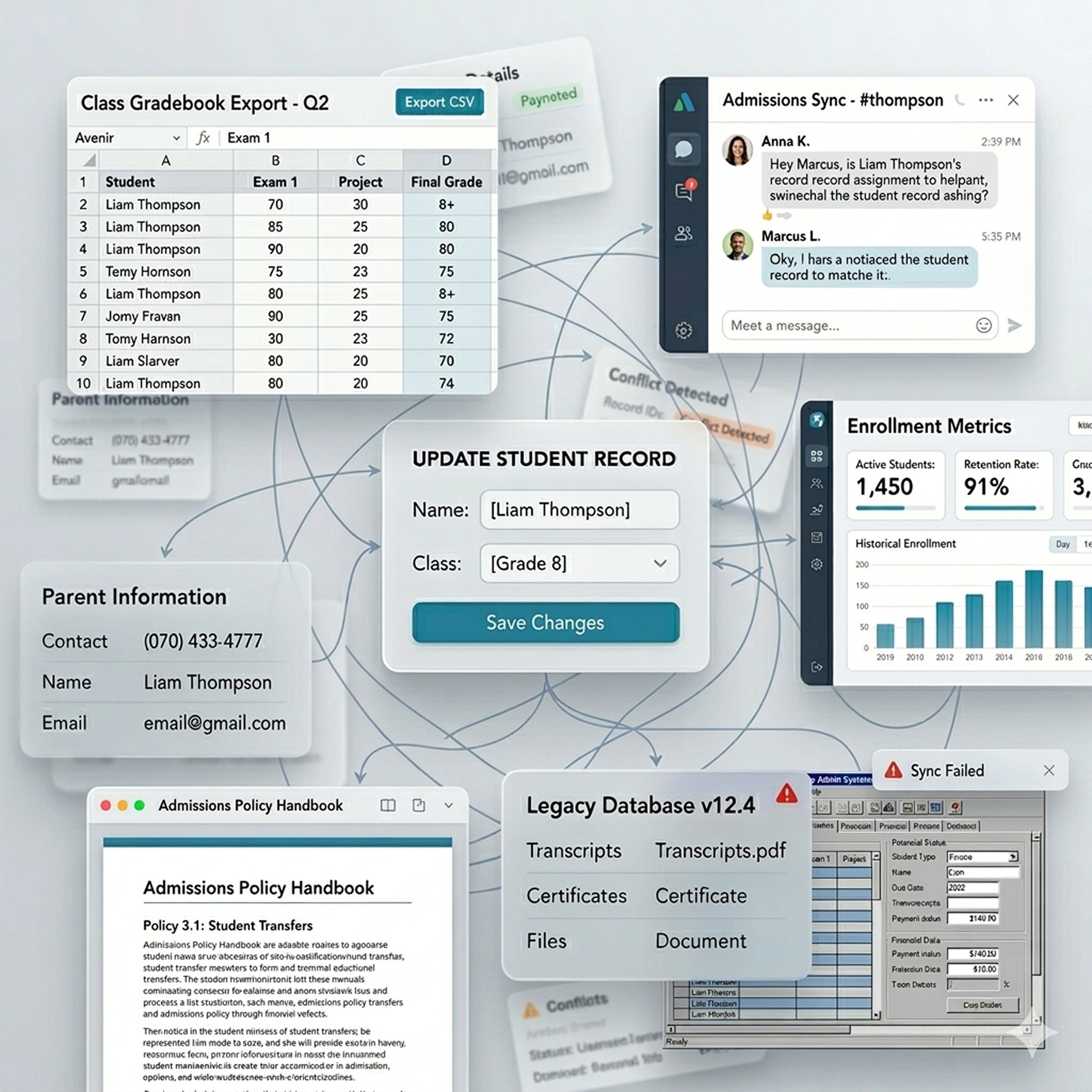
Observing day-to-day school operations made it clear the issue wasn’t effort, but how everything was structured across disconnected systems and workflows.
In most schools, a large part of administrative work still depends on outdated systems and manual coordination, making even routine tasks slower and more error-prone than they should be. Managing data, finances, and resources becomes difficult when information is spread across disconnected places without a clear structure. Daily operations rely heavily on constant communication between staff, teachers, and parents, where even small gaps can lead to delays or misalignment. Over time, this shifts the focus from running the school efficiently to continuously fixing issues, affecting both decision-making and overall operational stability.

Research & Discovery
Conducted interviews with 4 school administrators and coordinators to understand how they manage daily operations, tools, and workflows.
01
Amplifying Your Impact
Tasks are spread across multiple systems, forcing admins to constantly switch between tools and manually coordinate information to keep records aligned.
02
Manual work dominates
Because systems don’t connect, even simple updates require repeated steps across platforms. Admins rely on manual tracking and follow-ups to maintain consistency.
03
Limited system visibility
Scattered and inconsistent data makes it difficult to maintain a clear overview of operations, slowing down decisions and reducing confidence in daily workflows.
User Understanding
Empathy Mapping
I found that admins are not lacking tools, but are forced to operate across disconnected systems where even simple tasks require manual coordination. Despite efforts to stay organized, fragmented workflows lead to inefficiency, errors, and constant operational friction.

User Journey
I found that while onboarding is structured, complexity increases sharply during daily use. Once admins begin managing operations, even simple tasks require navigating multiple tools, leading to constant context switching. This shifts their focus from completing tasks to managing systems, reducing efficiency across everyday workflows.

User Persona
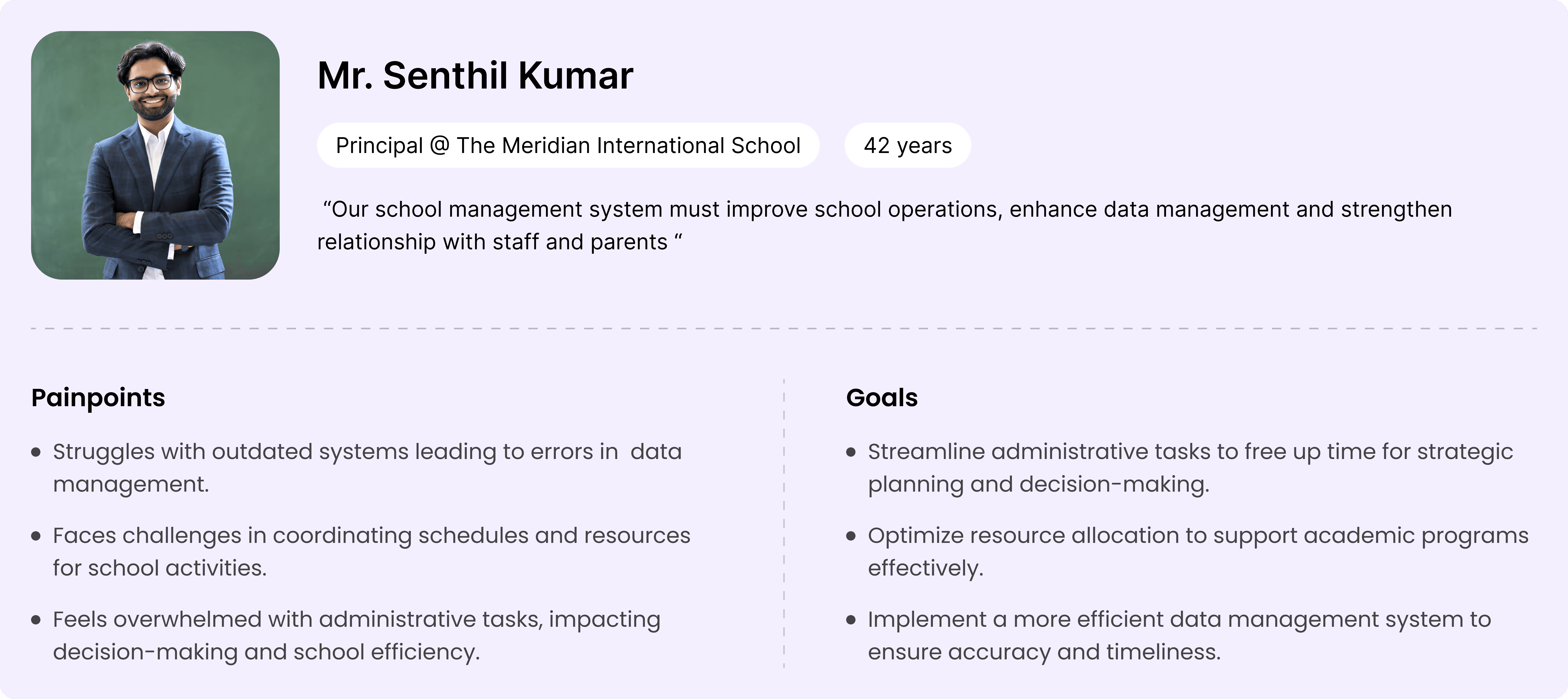
I found that admins like Mr. Senthil Kumar are responsible for keeping school operations efficient while managing data, coordination, and decisions. However, fragmented systems shift their time toward administrative work instead of strategic priorities, reducing visibility and control over daily operations.
Course of Action
Breaking down research findings to decide how the system should actually work
The research made it clear that the challenge was not what the system could do, but how work was structured across it. I focused on defining how tasks, data, and workflows come together, shaping the system around real operations and refining it through user feedback.
01
Structured the System Around Operations
I organized the system around core administrative operations like managing students, academics, and records, ensuring related information and actions are grouped within the same context.
02
Mapped Task Flows Based on Usage
I designed workflows based on how admins carry out tasks, allowing actions to follow a natural progression instead of being scattered across different sections.
03
Brought Actions and Data Together
I aligned related actions and information within the same flow, so tasks can be completed without unnecessary switching or manual coordination across the system.
04
Refined Flows Through User Feedback
I tested key workflows to observe how users interact with the system, refining flows to better match real usage patterns and make everyday operations easier to manage.
System Design
User Flow
Core workflows such as student and academic management are structured around how tasks are actually performed, not how features are separated. Related actions are brought into a single, continuous flow, reducing unnecessary navigation and context switching, and enabling routine tasks to be completed more efficiently.


Information Architecture
The system is organized around key operational areas, where related functionalities are grouped based on how they are used together rather than as separate features. This reduces the need to search across sections, making it easier to locate actions and understand how different parts of the system connect.

Initial Ideas
Shaping data-heavy workflows into clear, usable screen structures
With the structure and flows defined, I focused on translating them into screens that can handle large amounts of data without overwhelming the user. The challenge was deciding what needs to be visible upfront, how actions should be placed alongside data, and how to avoid pushing users into deeper navigation. Through iterations, I worked towards layouts that balance overview and detail, reduce the number of screens, and keep tasks within a single working context.

Design System
Building a visual system that keeps data, states, and actions consistent across the product
After defining the structure and flows, I focused on creating a consistent interface system that can scale across different modules. The goal was to ensure that data, actions, and system states behave predictably, so users don’t have to relearn interactions as they move through the product.
Design Principles
Prioritized clarity to make data-heavy screens easy to scan
Reduced visual noise to focus attention on key information
Ensured consistency so interactions feel predictable across modules
System Consistency & States
I defined a consistent system for colors, components, and interaction states to ensure the interface behaves predictably across the product. From status indicators to multi-state components, each element is designed to clearly communicate system feedback during real workflows.

Dashboard
A centralized view to track daily operations and act on what matters immediately
The dashboard provides a clear overview of ongoing school activities, bringing together key data, tasks, and updates into a single view. This helps admins quickly understand the current state of operations and take action without unnecessary navigation.
Problem
Daily monitoring requires keeping track of multiple types of information such as tasks, schedules, and updates, which can become time-consuming when not easily accessible in one place.
Solution
The dashboard consolidates essential information including key metrics, schedules, tasks, and updates, allowing admins to quickly assess situations and take action within the same view.
Rationale
Since admins frequently perform quick checks and follow-ups, surfacing critical information alongside actionable elements supports faster understanding and reduces effort in managing daily operations.
Impact
Enables quicker access to important information and supports more efficient handling of day-to-day activities.

Student Records
Working with large student data in a way that stays easy to scan, compare, and act on
This screen is designed for continuous use, where admins frequently scan, compare, and update student records. The focus was on structuring high-density data in a way that supports quick understanding while keeping actions easily accessible within the same context.
Problem
Managing student records involves scanning large datasets, where finding, comparing, and updating information becomes time-consuming without a clear structure.
Solution
Student data is structured into a clear, scannable table with aligned attributes, filters, and bulk actions, allowing admins to manage records without leaving the context.
Rationale
Consistent alignment and hierarchy help users quickly scan and compare multiple records, while keeping actions within the same view reduces effort during repeated tasks.
Impact
Reduces the effort required to scan, compare, and update records by keeping information and actions in one place, making routine data handling faster and more manageable.

Student Profile
Designing a single place to understand everything about a student without breaking context
Student information isn’t just detailed, it’s spread across different types of data—from records and documents to performance and attendance. The system brings these together in a way that lets users move across them without losing where they are.
Problem
Understanding a student requires switching between different types of data like records, documents, and performance, making it hard to stay focused on a single context.
Solution
All student data is brought into one system and divided into focused sections, allowing users to move across different information without leaving the same flow.
Rationale
Keeping everything within one structure reduces context switching, while separating sections ensures users aren’t overloaded when dealing with detailed information.
Impact
Reduces the need to jump across sections when reviewing student data, allowing users to move from understanding to action within the same flow.

Academics
Managing syllabus, materials, and assignments across multiple levels without losing structure
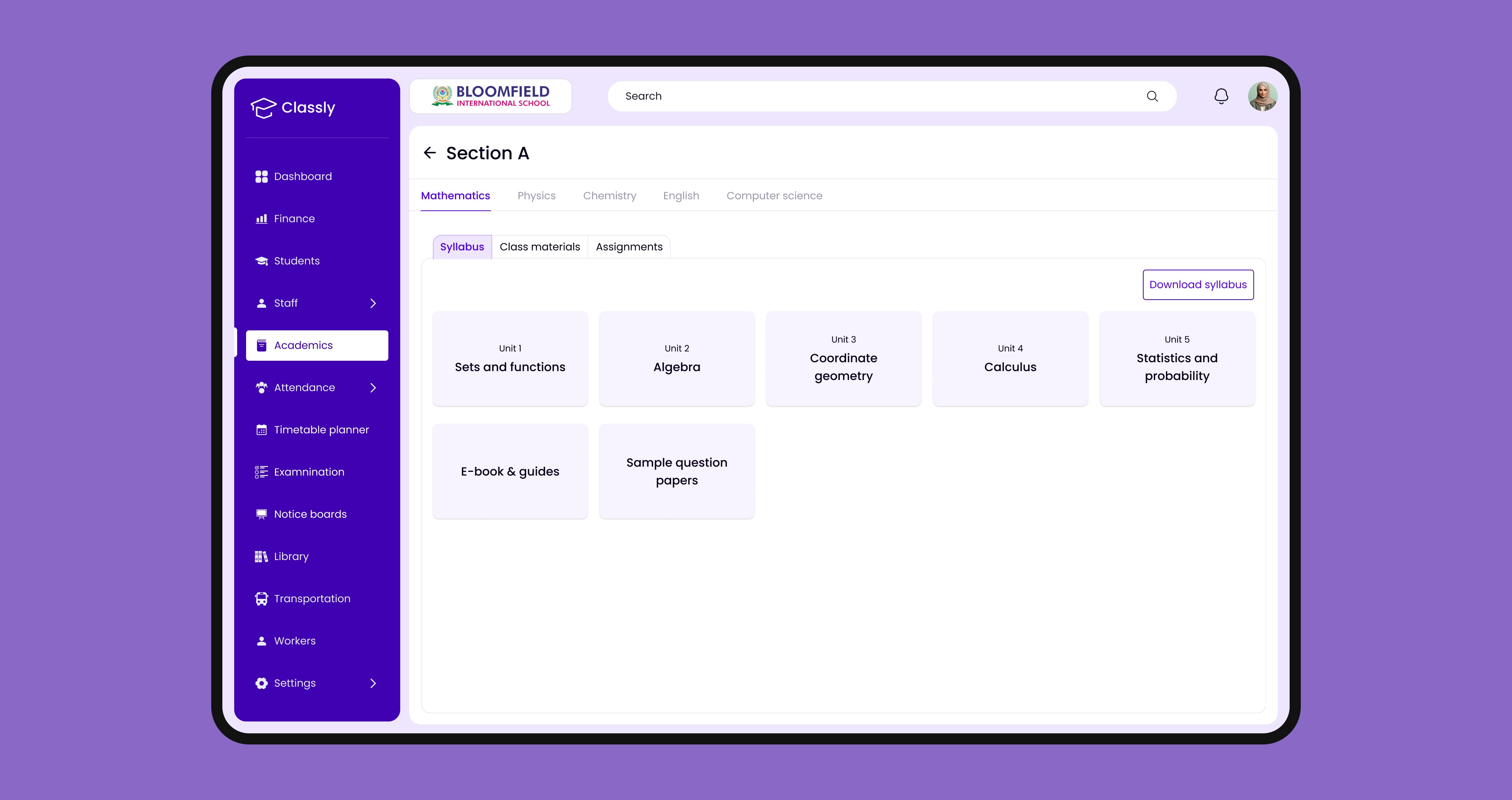
Academic information is organized across class, section, and subject levels, with syllabus, materials, and assignments handled within each subject. This keeps everything structured while allowing easy creation and access.
Problem
Managing syllabus, materials, and assignments across classes, sections, and subjects becomes complex when these layers are not clearly structured.
Solution
The system organizes information by class, section, and subject, with syllabus, materials, and assignments grouped within each subject for easier access and creation.
Rationale
Following the academic hierarchy ensures users navigate in a familiar way, while grouping related items within a subject keeps everything connected.
Impact
Enables users to manage syllabus, materials, and assignments across classes and subjects without breaking their flow or losing track of structure.
Attendance
Handling attendance as a quick, repeatable task without slowing down the classroom flow
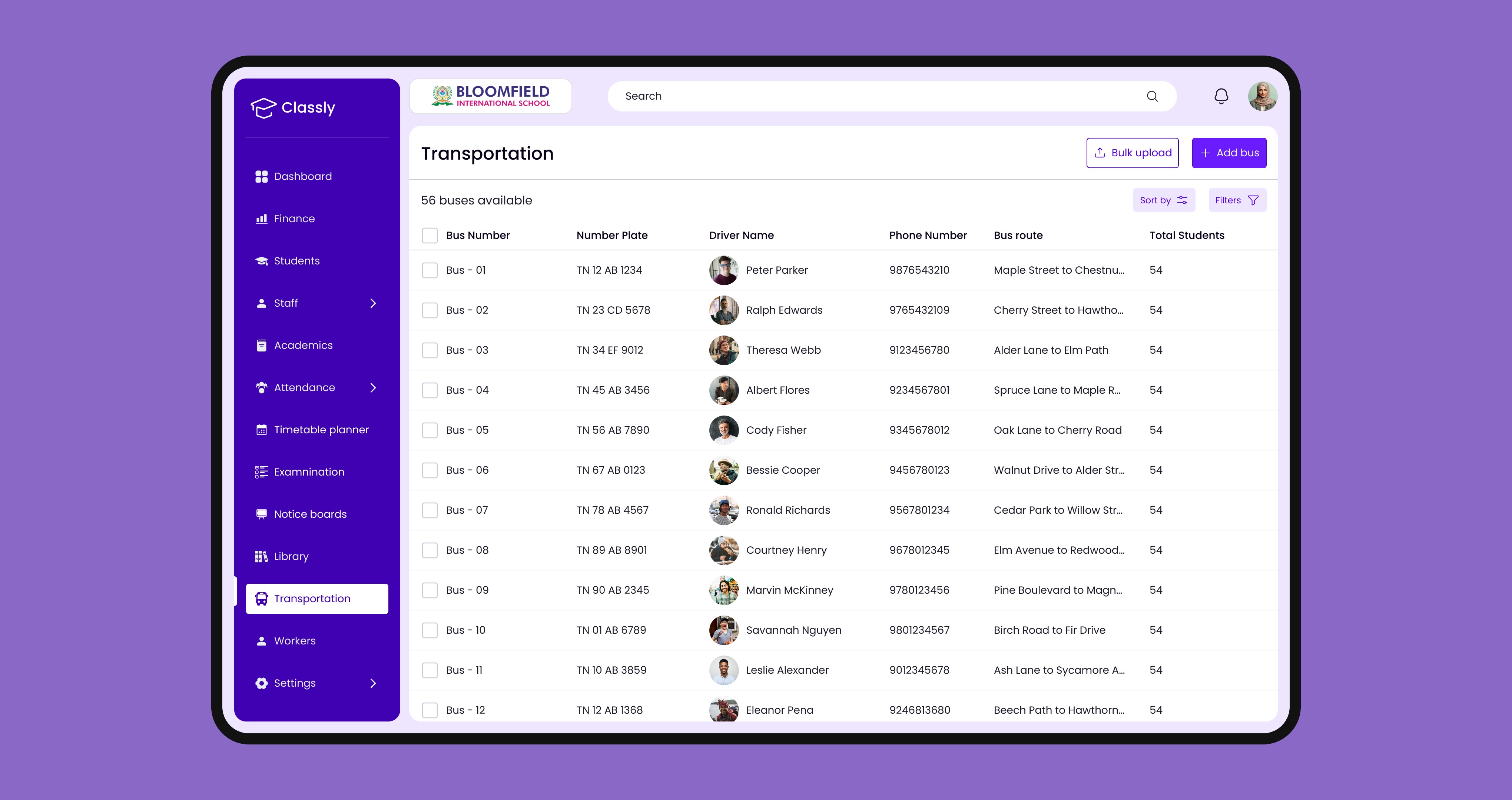
Attendance is taken frequently and under time pressure. The interface is designed to let teachers move through an entire class quickly, with clear visibility and minimal interaction needed to mark and review attendance.
Problem
Marking attendance for a full class involves repetitive actions, where even small inefficiencies can slow down the process and increase the chance of missing or incorrect entries.
Solution
All students are presented in a single view with simple selection controls, allowing teachers to mark attendance quickly while keeping full visibility of the class.
Rationale
Reducing interaction steps and keeping the entire class visible helps maintain rhythm, making it easier to complete attendance without breaking focus.
Impact
Allows teachers to complete attendance in a smooth, uninterrupted flow, reducing friction and helping maintain accuracy during repetitive daily use.





Usability Testing
Understanding how users navigate and complete tasks through real interaction patterns
Usability testing with 5 participants across admin and teaching roles focused on how users move through workflows, where they hesitate, and how clearly actions and information are understood.
Observation
Users moved through tasks without pausing to figure out where to go next, and actions were performed immediately where they expected them.
Behavior
Interactions stayed focused around key areas, with very little backtracking or repeated attempts to find actions.
Insight
Keeping actions closely tied to the context in which they are needed helped users act without breaking their flow or scanning across the interface.
Validation
The system supported both quick updates and deeper tasks in a continuous flow, without users needing external guidance or trial-and-error.

Overall Impact
Coordination Dependency
Work no longer relies on manual follow-ups across people or systems
Execution Throughput
More tasks move forward without getting blocked or delayed
Process Friction
Fewer interruptions and handoffs during task completion
Operational Consistency
Tasks follow the same structured path across different workflows
Error Surface
Reduced chances of missed steps or incorrect updates
Decision Readiness
Users have what they need to act immediately without extra checks
More Works
(GQ® — 02)
©2024
A unified system to run daily school operations
EdTech
SaaS B2B
Overview
In the schools I looked into, admins spent most of their time coordinating across scattered tools and follow-ups. This case study restructures those workflows into one clearer, more predictable system.
Operational Effort
Reduced manual coordination and repetitive administrative work
Unified Workflows
Core tasks handled within a single, structured system
Task Completion Speed
Tasks completed without delays or unnecessary steps
Role
End to End Product Design
Tools
Contributors
Problem
Observing day-to-day school operations made it clear the issue wasn’t effort, but how everything was structured across disconnected systems and workflows.
In most schools, a large part of administrative work still depends on outdated systems and manual coordination, making even routine tasks slower and more error-prone than they should be. Managing data, finances, and resources becomes difficult when information is spread across disconnected places without a clear structure. Daily operations rely heavily on constant communication between staff, teachers, and parents, where even small gaps can lead to delays or misalignment. Over time, this shifts the focus from running the school efficiently to continuously fixing issues, affecting both decision-making and overall operational stability.
Research & Discovery
Conducted interviews with 4 school administrators and coordinators to understand how they manage daily operations, tools, and workflows.
01
Amplifying Your Impact
Tasks are spread across multiple systems, forcing admins to constantly switch between tools and manually coordinate information to keep records aligned.
02
Manual work dominates
Because systems don’t connect, even simple updates require repeated steps across platforms. Admins rely on manual tracking and follow-ups to maintain consistency.
03
Limited system visibility
Scattered and inconsistent data makes it difficult to maintain a clear overview of operations, slowing down decisions and reducing confidence in daily workflows.
User Understanding
Empathy Mapping
I found that admins are not lacking tools, but are forced to operate across disconnected systems where even simple tasks require manual coordination. Despite efforts to stay organized, fragmented workflows lead to inefficiency, errors, and constant operational friction.
User Journey
I found that while onboarding is structured, complexity increases sharply during daily use. Once admins begin managing operations, even simple tasks require navigating multiple tools, leading to constant context switching. This shifts their focus from completing tasks to managing systems, reducing efficiency across everyday workflows.
User Persona
I found that admins like Mr. Senthil Kumar are responsible for keeping school operations efficient while managing data, coordination, and decisions. However, fragmented systems shift their time toward administrative work instead of strategic priorities, reducing visibility and control over daily operations.
Course of Action
Breaking down research findings to decide how the system should actually work
The research made it clear that the challenge was not what the system could do, but how work was structured across it. I focused on defining how tasks, data, and workflows come together, shaping the system around real operations and refining it through user feedback.
01
Structured the System Around Operations
I organized the system around core administrative operations like managing students, academics, and records, ensuring related information and actions are grouped within the same context.
02
Mapped Task Flows Based on Usage
I designed workflows based on how admins carry out tasks, allowing actions to follow a natural progression instead of being scattered across different sections.
03
Brought Actions and Data Together
I aligned related actions and information within the same flow, so tasks can be completed without unnecessary switching or manual coordination across the system.
04
Refined Flows Through User Feedback
I tested key workflows to observe how users interact with the system, refining flows to better match real usage patterns and make everyday operations easier to manage.
System Design
User Flow
Core workflows such as student and academic management are structured around how tasks are actually performed, not how features are separated. Related actions are brought into a single, continuous flow, reducing unnecessary navigation and context switching, and enabling routine tasks to be completed more efficiently.
Information Architecture
The system is organized around key operational areas, where related functionalities are grouped based on how they are used together rather than as separate features. This reduces the need to search across sections, making it easier to locate actions and understand how different parts of the system connect.
Initial Ideas
Shaping data-heavy workflows into clear, usable screen structures
With the structure and flows defined, I focused on translating them into screens that can handle large amounts of data without overwhelming the user. The challenge was deciding what needs to be visible upfront, how actions should be placed alongside data, and how to avoid pushing users into deeper navigation. Through iterations, I worked towards layouts that balance overview and detail, reduce the number of screens, and keep tasks within a single working context.
Design System
Building a visual system that keeps data, states, and actions consistent across the product
After defining the structure and flows, I focused on creating a consistent interface system that can scale across different modules. The goal was to ensure that data, actions, and system states behave predictably, so users don’t have to relearn interactions as they move through the product.
Design Principles
Prioritized clarity to make data-heavy screens easy to scan
Reduced visual noise to focus attention on key information
Ensured consistency so interactions feel predictable across modules
System Consistency & States
I defined a consistent system for colors, components, and interaction states to ensure the interface behaves predictably across the product. From status indicators to multi-state components, each element is designed to clearly communicate system feedback during real workflows.
Dashboard
A centralized view to track daily operations and act on what matters immediately
The dashboard provides a clear overview of ongoing school activities, bringing together key data, tasks, and updates into a single view. This helps admins quickly understand the current state of operations and take action without unnecessary navigation.
Problem
Daily monitoring requires keeping track of multiple types of information such as tasks, schedules, and updates, which can become time-consuming when not easily accessible in one place.
Solution
The dashboard consolidates essential information including key metrics, schedules, tasks, and updates, allowing admins to quickly assess situations and take action within the same view.
Rationale
Since admins frequently perform quick checks and follow-ups, surfacing critical information alongside actionable elements supports faster understanding and reduces effort in managing daily operations.
Impact
Enables quicker access to important information and supports more efficient handling of day-to-day activities.
Student Records
Working with large student data in a way that stays easy to scan, compare, and act on
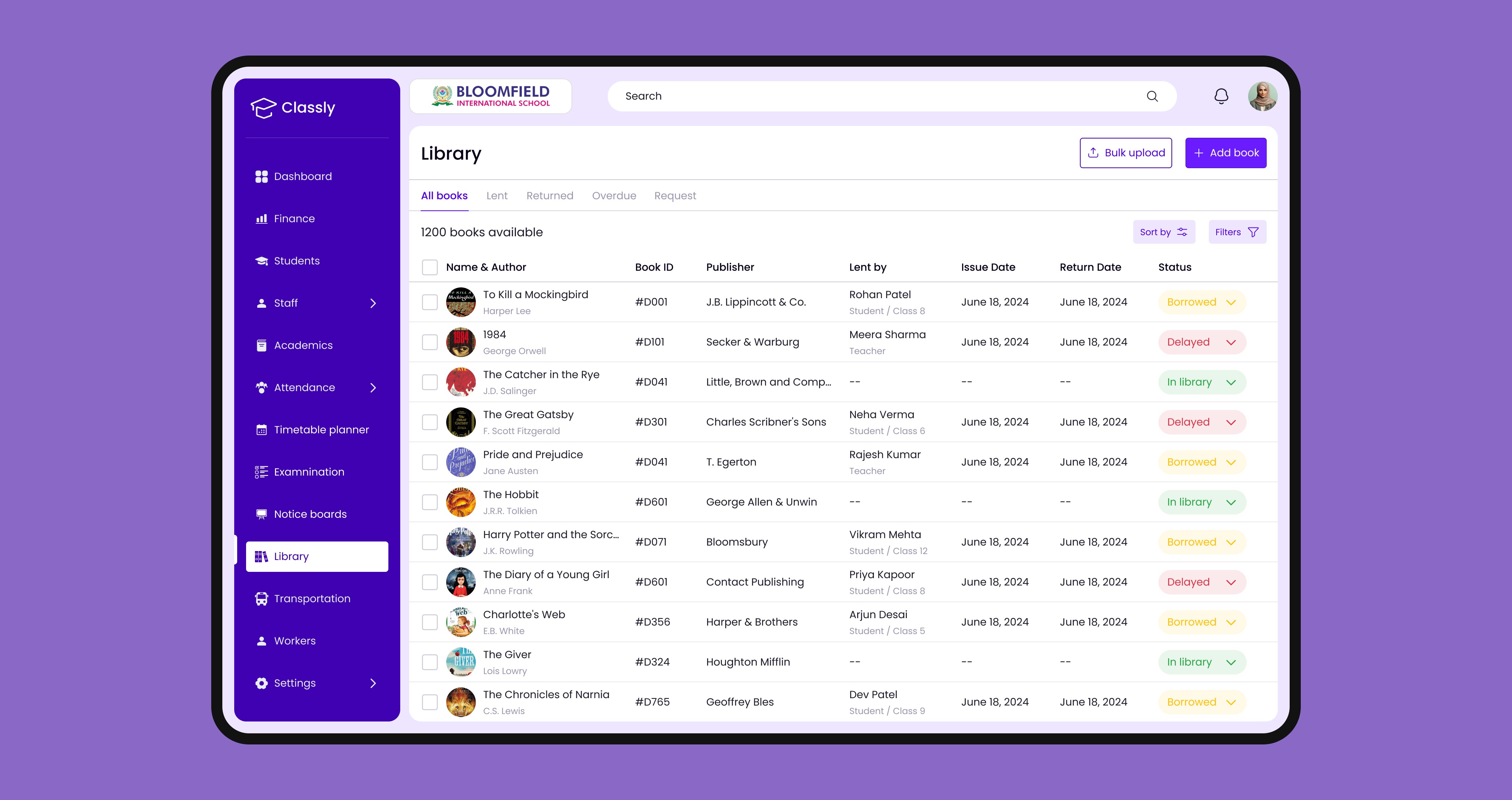
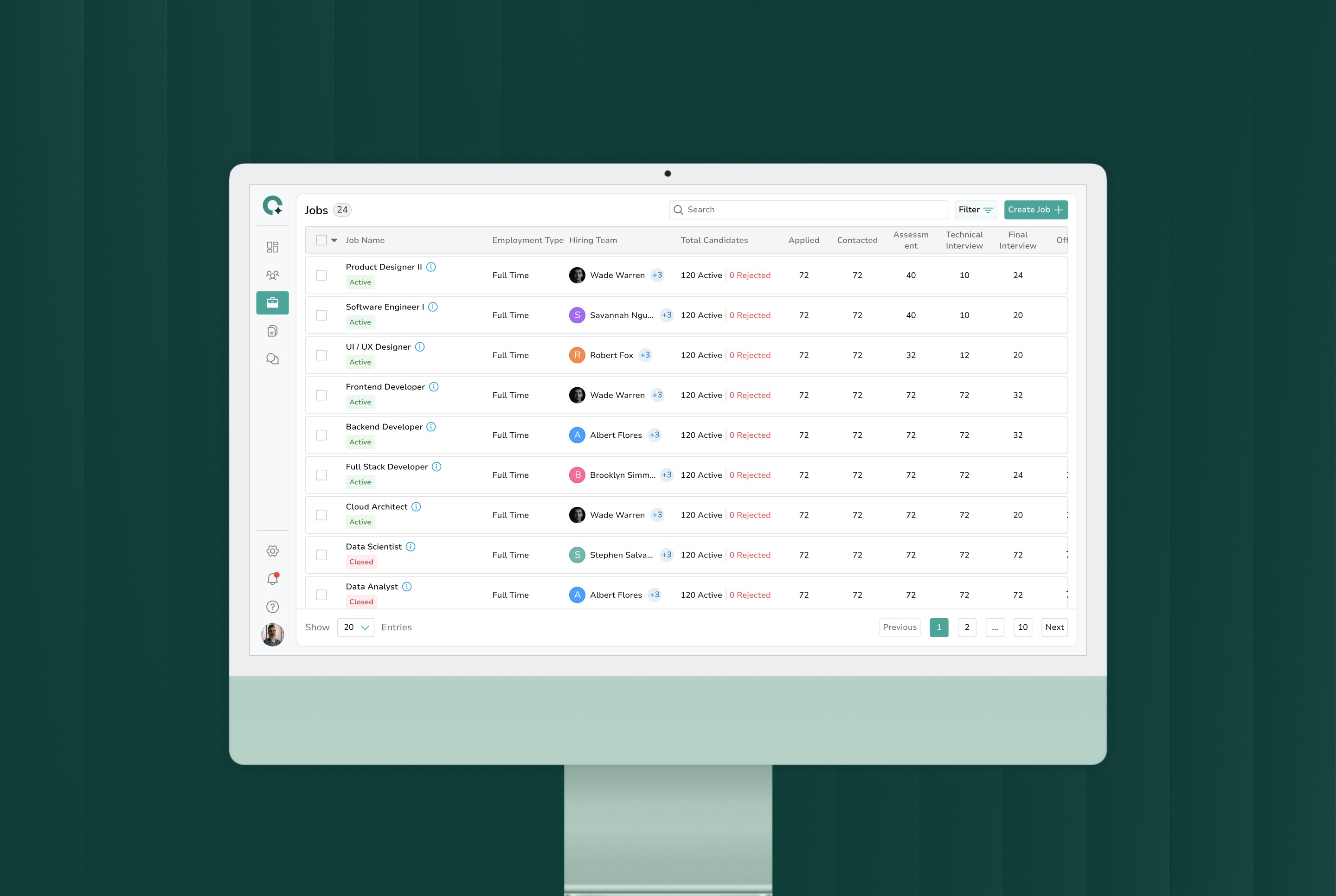
This screen is designed for continuous use, where admins frequently scan, compare, and update student records. The focus was on structuring high-density data in a way that supports quick understanding while keeping actions easily accessible within the same context.
Problem
Managing student records involves scanning large datasets, where finding, comparing, and updating information becomes time-consuming without a clear structure.
Solution
Student data is structured into a clear, scannable table with aligned attributes, filters, and bulk actions, allowing admins to manage records without leaving the context.
Rationale
Consistent alignment and hierarchy help users quickly scan and compare multiple records, while keeping actions within the same view reduces effort during repeated tasks.
Impact
Reduces the effort required to scan, compare, and update records by keeping information and actions in one place, making routine data handling faster and more manageable.
Student Profile
Designing a single place to understand everything about a student without breaking context
Student information isn’t just detailed, it’s spread across different types of data—from records and documents to performance and attendance. The system brings these together in a way that lets users move across them without losing where they are.
Problem
Understanding a student requires switching between different types of data like records, documents, and performance, making it hard to stay focused on a single context.
Solution
All student data is brought into one system and divided into focused sections, allowing users to move across different information without leaving the same flow.
Rationale
Keeping everything within one structure reduces context switching, while separating sections ensures users aren’t overloaded when dealing with detailed information.
Impact
Reduces the need to jump across sections when reviewing student data, allowing users to move from understanding to action within the same flow.
Academics
Managing syllabus, materials, and assignments across multiple levels without losing structure
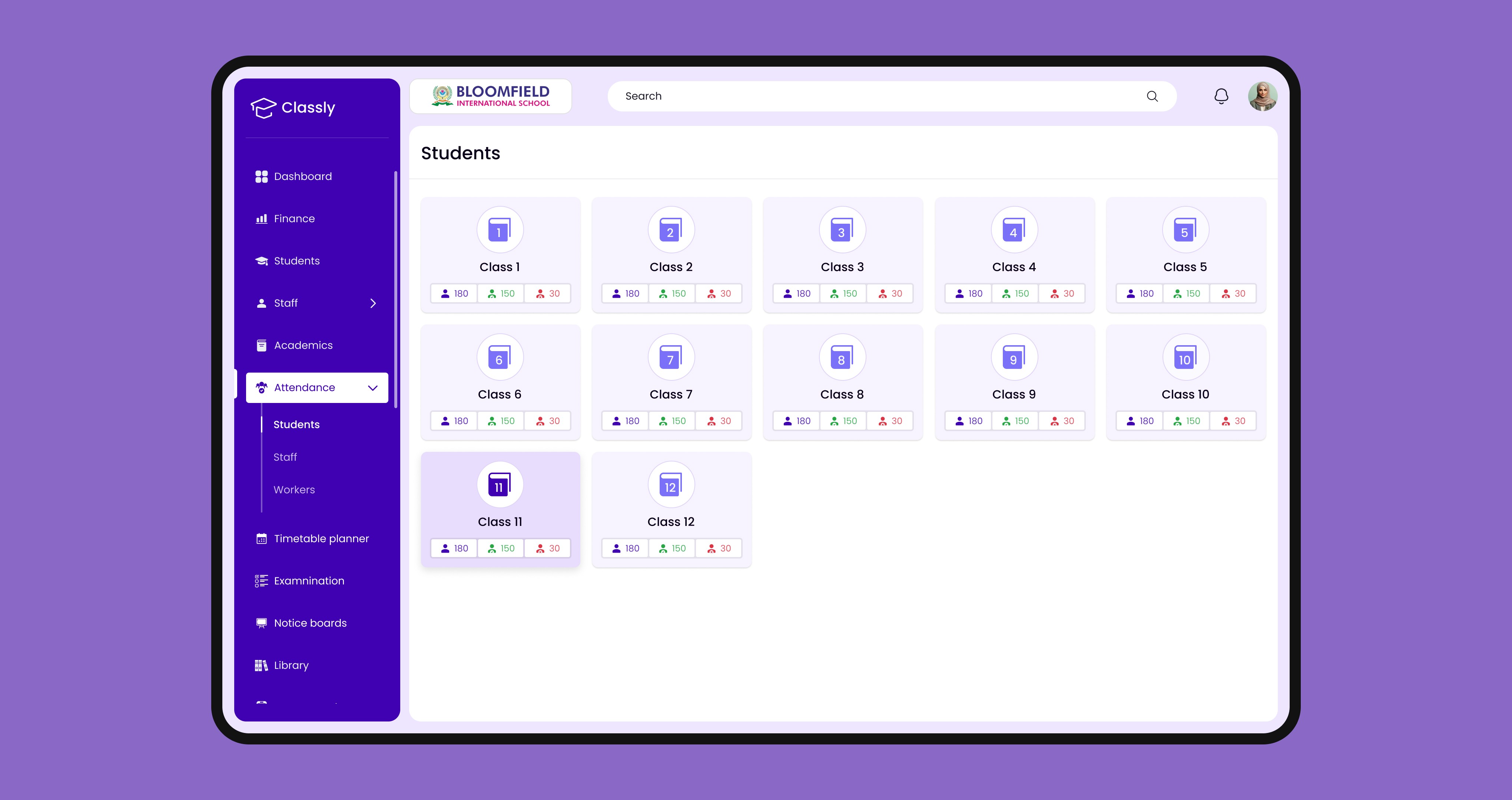
Academic information is organized across class, section, and subject levels, with syllabus, materials, and assignments handled within each subject. This keeps everything structured while allowing easy creation and access.
Problem
Managing syllabus, materials, and assignments across classes, sections, and subjects becomes complex when these layers are not clearly structured.
Solution
The system organizes information by class, section, and subject, with syllabus, materials, and assignments grouped within each subject for easier access and creation.
Rationale
Following the academic hierarchy ensures users navigate in a familiar way, while grouping related items within a subject keeps everything connected.
Impact
Enables users to manage syllabus, materials, and assignments across classes and subjects without breaking their flow or losing track of structure.
Attendance
Handling attendance as a quick, repeatable task without slowing down the classroom flow
Attendance is taken frequently and under time pressure. The interface is designed to let teachers move through an entire class quickly, with clear visibility and minimal interaction needed to mark and review attendance.
Problem
Marking attendance for a full class involves repetitive actions, where even small inefficiencies can slow down the process and increase the chance of missing or incorrect entries.
Solution
All students are presented in a single view with simple selection controls, allowing teachers to mark attendance quickly while keeping full visibility of the class.
Rationale
Reducing interaction steps and keeping the entire class visible helps maintain rhythm, making it easier to complete attendance without breaking focus.
Impact
Allows teachers to complete attendance in a smooth, uninterrupted flow, reducing friction and helping maintain accuracy during repetitive daily use.
Usability Testing
Understanding how users navigate and complete tasks through real interaction patterns
Usability testing with 5 participants across admin and teaching roles focused on how users move through workflows, where they hesitate, and how clearly actions and information are understood.
Observation
Users moved through tasks without pausing to figure out where to go next, and actions were performed immediately where they expected them.
Behavior
Interactions stayed focused around key areas, with very little backtracking or repeated attempts to find actions.
Insight
Keeping actions closely tied to the context in which they are needed helped users act without breaking their flow or scanning across the interface.
Validation
The system supported both quick updates and deeper tasks in a continuous flow, without users needing external guidance or trial-and-error.
Overall Impact
Coordination Dependency
Work no longer relies on manual follow-ups across people or systems
Execution Throughput
More tasks move forward without getting blocked or delayed
Process Friction
Fewer interruptions and handoffs during task completion
Operational Consistency
Tasks follow the same structured path across different workflows
Error Surface
Reduced chances of missed steps or incorrect updates
Decision Readiness
Users have what they need to act immediately without extra checks
More Works
©2024
A unified system to run daily school operations
EdTech
SaaS B2B
Overview
In the schools I looked into, admins spent most of their time coordinating across scattered tools and follow-ups. This case study restructures those workflows into one clearer, more predictable system.
Operational Effort
Reduced manual coordination and repetitive administrative work
Unified Workflows
Core tasks handled within a single, structured system
Task Completion Speed
Tasks completed without delays or unnecessary steps
Role
End to End Product Design
Tools
Contributors
Problem
Observing day-to-day school operations made it clear the issue wasn’t effort, but how everything was structured across disconnected systems and workflows.
In most schools, a large part of administrative work still depends on outdated systems and manual coordination, making even routine tasks slower and more error-prone than they should be. Managing data, finances, and resources becomes difficult when information is spread across disconnected places without a clear structure. Daily operations rely heavily on constant communication between staff, teachers, and parents, where even small gaps can lead to delays or misalignment. Over time, this shifts the focus from running the school efficiently to continuously fixing issues, affecting both decision-making and overall operational stability.
Research & Discovery
Conducted interviews with 4 school administrators and coordinators to understand how they manage daily operations, tools, and workflows.
01
Amplifying Your Impact
Tasks are spread across multiple systems, forcing admins to constantly switch between tools and manually coordinate information to keep records aligned.
02
Manual work dominates
Because systems don’t connect, even simple updates require repeated steps across platforms. Admins rely on manual tracking and follow-ups to maintain consistency.
03
Limited system visibility
Scattered and inconsistent data makes it difficult to maintain a clear overview of operations, slowing down decisions and reducing confidence in daily workflows.
User Understanding
Empathy Mapping
I found that admins are not lacking tools, but are forced to operate across disconnected systems where even simple tasks require manual coordination. Despite efforts to stay organized, fragmented workflows lead to inefficiency, errors, and constant operational friction.
User Journey
I found that while onboarding is structured, complexity increases sharply during daily use. Once admins begin managing operations, even simple tasks require navigating multiple tools, leading to constant context switching. This shifts their focus from completing tasks to managing systems, reducing efficiency across everyday workflows.
User Persona
I found that admins like Mr. Senthil Kumar are responsible for keeping school operations efficient while managing data, coordination, and decisions. However, fragmented systems shift their time toward administrative work instead of strategic priorities, reducing visibility and control over daily operations.
Course of Action
Breaking down research findings to decide how the system should actually work
The research made it clear that the challenge was not what the system could do, but how work was structured across it. I focused on defining how tasks, data, and workflows come together, shaping the system around real operations and refining it through user feedback.
01
Structured the System Around Operations
I organized the system around core administrative operations like managing students, academics, and records, ensuring related information and actions are grouped within the same context.
02
Mapped Task Flows Based on Usage
I designed workflows based on how admins carry out tasks, allowing actions to follow a natural progression instead of being scattered across different sections.
03
Brought Actions and Data Together
I aligned related actions and information within the same flow, so tasks can be completed without unnecessary switching or manual coordination across the system.
04
Refined Flows Through User Feedback
I tested key workflows to observe how users interact with the system, refining flows to better match real usage patterns and make everyday operations easier to manage.
System Design
User Flow
Core workflows such as student and academic management are structured around how tasks are actually performed, not how features are separated. Related actions are brought into a single, continuous flow, reducing unnecessary navigation and context switching, and enabling routine tasks to be completed more efficiently.
Information Architecture
The system is organized around key operational areas, where related functionalities are grouped based on how they are used together rather than as separate features. This reduces the need to search across sections, making it easier to locate actions and understand how different parts of the system connect.
Initial Ideas
Shaping data-heavy workflows into clear, usable screen structures
With the structure and flows defined, I focused on translating them into screens that can handle large amounts of data without overwhelming the user. The challenge was deciding what needs to be visible upfront, how actions should be placed alongside data, and how to avoid pushing users into deeper navigation. Through iterations, I worked towards layouts that balance overview and detail, reduce the number of screens, and keep tasks within a single working context.
Design System
Building a visual system that keeps data, states, and actions consistent across the product
After defining the structure and flows, I focused on creating a consistent interface system that can scale across different modules. The goal was to ensure that data, actions, and system states behave predictably, so users don’t have to relearn interactions as they move through the product.
Design Principles
Prioritized clarity to make data-heavy screens easy to scan
Reduced visual noise to focus attention on key information
Ensured consistency so interactions feel predictable across modules
System Consistency & States
I defined a consistent system for colors, components, and interaction states to ensure the interface behaves predictably across the product. From status indicators to multi-state components, each element is designed to clearly communicate system feedback during real workflows.
Dashboard
A centralized view to track daily operations and act on what matters immediately
The dashboard provides a clear overview of ongoing school activities, bringing together key data, tasks, and updates into a single view. This helps admins quickly understand the current state of operations and take action without unnecessary navigation.
Problem
Daily monitoring requires keeping track of multiple types of information such as tasks, schedules, and updates, which can become time-consuming when not easily accessible in one place.
Solution
The dashboard consolidates essential information including key metrics, schedules, tasks, and updates, allowing admins to quickly assess situations and take action within the same view.
Rationale
Since admins frequently perform quick checks and follow-ups, surfacing critical information alongside actionable elements supports faster understanding and reduces effort in managing daily operations.
Impact
Enables quicker access to important information and supports more efficient handling of day-to-day activities.
Student Records
Working with large student data in a way that stays easy to scan, compare, and act on
This screen is designed for continuous use, where admins frequently scan, compare, and update student records. The focus was on structuring high-density data in a way that supports quick understanding while keeping actions easily accessible within the same context.
Problem
Managing student records involves scanning large datasets, where finding, comparing, and updating information becomes time-consuming without a clear structure.
Solution
Student data is structured into a clear, scannable table with aligned attributes, filters, and bulk actions, allowing admins to manage records without leaving the context.
Rationale
Consistent alignment and hierarchy help users quickly scan and compare multiple records, while keeping actions within the same view reduces effort during repeated tasks.
Impact
Reduces the effort required to scan, compare, and update records by keeping information and actions in one place, making routine data handling faster and more manageable.
Student Profile
Designing a single place to understand everything about a student without breaking context
Student information isn’t just detailed, it’s spread across different types of data—from records and documents to performance and attendance. The system brings these together in a way that lets users move across them without losing where they are.
Problem
Understanding a student requires switching between different types of data like records, documents, and performance, making it hard to stay focused on a single context.
Solution
All student data is brought into one system and divided into focused sections, allowing users to move across different information without leaving the same flow.
Rationale
Keeping everything within one structure reduces context switching, while separating sections ensures users aren’t overloaded when dealing with detailed information.
Impact
Reduces the need to jump across sections when reviewing student data, allowing users to move from understanding to action within the same flow.
Academics
Managing syllabus, materials, and assignments across multiple levels without losing structure
Academic information is organized across class, section, and subject levels, with syllabus, materials, and assignments handled within each subject. This keeps everything structured while allowing easy creation and access.
Problem
Managing syllabus, materials, and assignments across classes, sections, and subjects becomes complex when these layers are not clearly structured.
Solution
The system organizes information by class, section, and subject, with syllabus, materials, and assignments grouped within each subject for easier access and creation.
Rationale
Following the academic hierarchy ensures users navigate in a familiar way, while grouping related items within a subject keeps everything connected.
Impact
Enables users to manage syllabus, materials, and assignments across classes and subjects without breaking their flow or losing track of structure.
Attendance
Handling attendance as a quick, repeatable task without slowing down the classroom flow
Attendance is taken frequently and under time pressure. The interface is designed to let teachers move through an entire class quickly, with clear visibility and minimal interaction needed to mark and review attendance.
Problem
Marking attendance for a full class involves repetitive actions, where even small inefficiencies can slow down the process and increase the chance of missing or incorrect entries.
Solution
All students are presented in a single view with simple selection controls, allowing teachers to mark attendance quickly while keeping full visibility of the class.
Rationale
Reducing interaction steps and keeping the entire class visible helps maintain rhythm, making it easier to complete attendance without breaking focus.
Impact
Allows teachers to complete attendance in a smooth, uninterrupted flow, reducing friction and helping maintain accuracy during repetitive daily use.
Usability Testing
Understanding how users navigate and complete tasks through real interaction patterns
Usability testing with 5 participants across admin and teaching roles focused on how users move through workflows, where they hesitate, and how clearly actions and information are understood.
Observation
Users moved through tasks without pausing to figure out where to go next, and actions were performed immediately where they expected them.
Behavior
Interactions stayed focused around key areas, with very little backtracking or repeated attempts to find actions.
Insight
Keeping actions closely tied to the context in which they are needed helped users act without breaking their flow or scanning across the interface.
Validation
The system supported both quick updates and deeper tasks in a continuous flow, without users needing external guidance or trial-and-error.
Overall Impact
Coordination Dependency
Work no longer relies on manual follow-ups across people or systems
Execution Throughput
More tasks move forward without getting blocked or delayed
Process Friction
Fewer interruptions and handoffs during task completion
Operational Consistency
Tasks follow the same structured path across different workflows
Error Surface
Reduced chances of missed steps or incorrect updates
Decision Readiness
Users have what they need to act immediately without extra checks
More Works
(GQ® — 02)
©2024